How to grow on Instagram: 3 steps to turn views into followers
Get each post past Instagram's first test, give new viewers a reason to visit your profile, and turn those visits into followers.
 Gabriela Moreno14 min read

On this page
In short
- Your account only grows when posts reach people who don't follow you yet. Check how many of each post's views came from non-followers.
- Every new follower takes three steps: they see a post, visit your profile and follow. Find the step where you lose the most people.
- Instagram tests each new post on a small group first. Win that test with a strong first three seconds and a reason to send the post.
- Make your profile answer one question fast: what do I get if I follow? Then give every new post a strong start in its first hours.
How to grow on Instagram
Your Reel gets a push for a few hours, then stops at the same number of views as always. Your follower count barely moves.
To grow on Instagram, a post has to reach people who don’t follow you yet, and those people need a reason to follow. When an account stalls, one of those two things is breaking. Posting more won’t fix it until you know which one.
Why “post more” stops working
You probably post every week already. You know what a hook is. Your Account status is all green. Still, your Reels hit the same wall: 200 views, or 2,000, or wherever yours is.
Followers can’t follow you twice. If most of a post’s views come from people who already follow you, that post can’t grow your account, however many likes it gets.
What You’ll Learn
- The numbers in Insights that show whether a post can grow your account
- How to find the step where new people drop off
- Why Reels flatline after a few hours, and how a post earns its next round
- How to turn more profile visits into follows
- A 30-day plan to test all of it on your own account
Key takeaway
Every new follower comes from someone who doesn’t follow you yet. Build each post for that person.
How does someone new end up following you?
Every new follower takes three steps: they see one of your posts, they visit your profile, and they decide to follow. Lose them at any step and the follow never happens.
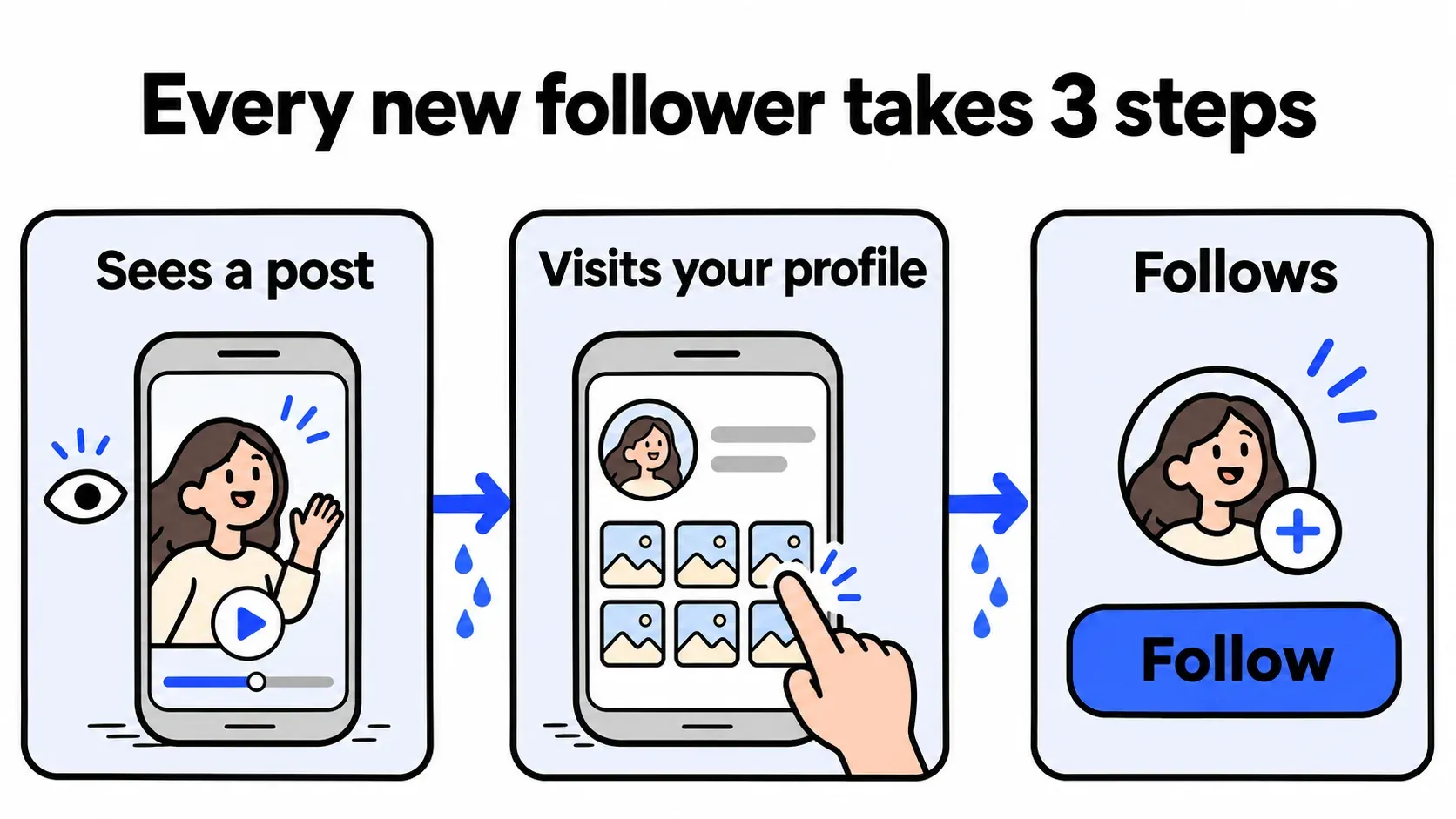
Instagram shows you every step. Open a post, tap View insights, and write down:
- Views, and how many came from non-followers
- Skip rate, for Reels: the share of views that left in the first three seconds
- Shares, the number of times people sent it
- Profile visits and follows, under Profile activity
Do this for your last 10 posts. Your account’s Insights can also show which posts brought in the most new followers. Start with those.
Here’s a made-up example from a food account:
| Trend Reel | Recipe carousel | |
|---|---|---|
| Views | 40,000 | 6,000 |
| From non-followers | 85% | 50% |
| Profile visits | 200 | 150 |
| Follows | 12 | 45 |
The trend Reel reached about 34,000 people who don’t follow the account. Only 200 tapped through, and 12 followed. The carousel reached about 3,000 new people, and 45 followed.
The Reel is good at reach and bad at giving people a reason to follow. The carousel is the opposite. Making more trend Reels because they get more views would be the wrong lesson.
Find your weakest step
| What you see | Where people drop off | Fix this first |
|---|---|---|
| Most views come from followers, and views stop at the same wall | The view | Build posts for strangers and give each a strong start |
| Lots of non-follower views, few profile visits | The visit | Give people a reason to want your next post |
| Plenty of profile visits, few follows | The follow | Make your profile say what people get if they follow |
Most stalled accounts lose people at the first step, so start there.
Why do Instagram posts stop getting views after a few hours?
Instagram shows each new post to a small audience first. The posts that do best there go out to bigger groups, whether those people follow you or not. That’s how Instagram explains its recommendations. A Reel that flatlines after a few hours usually didn’t win its first test.
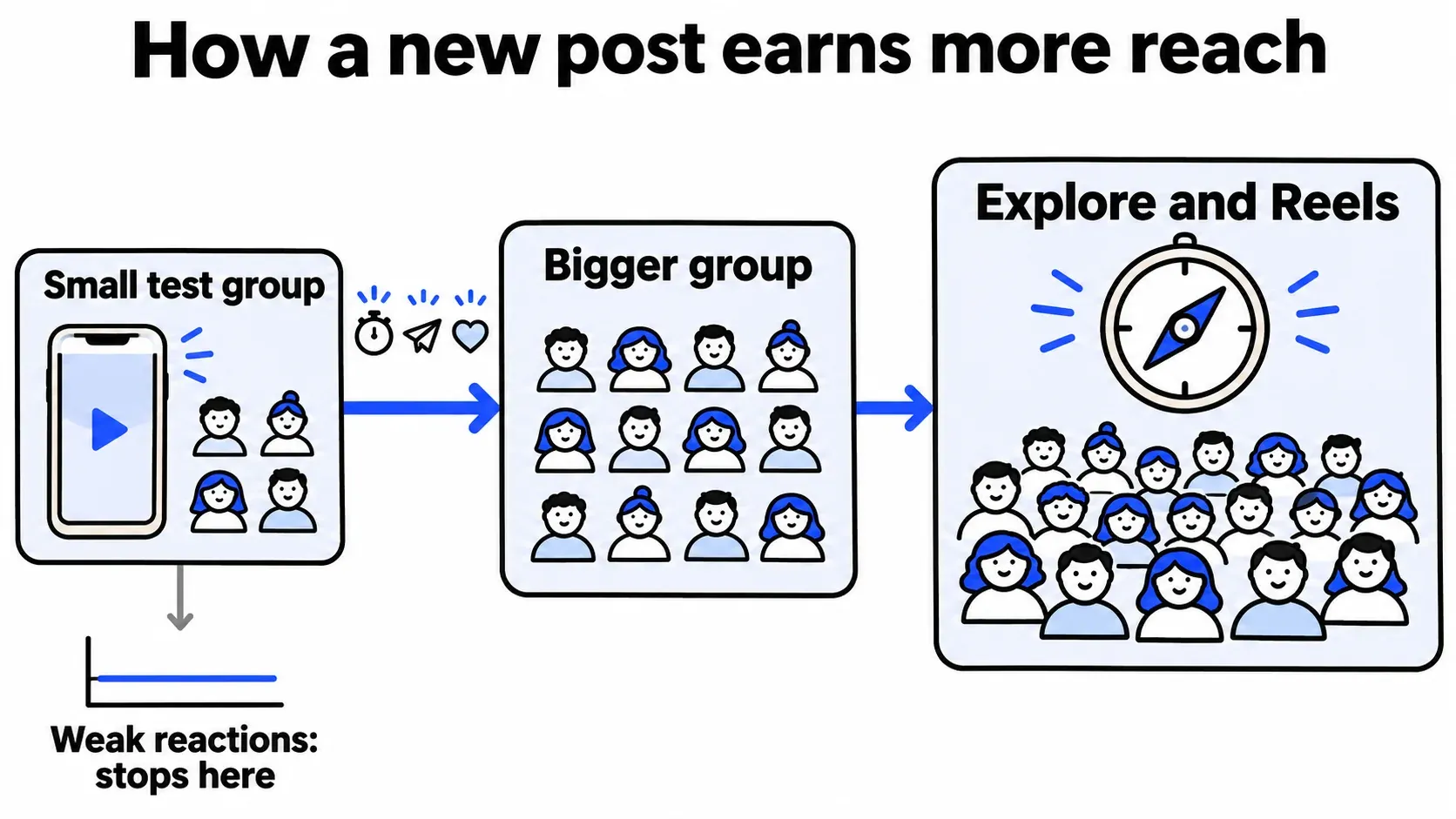
So what decides the test? Adam Mosseri, who runs Instagram, has named the three signals that matter most:
- Watch time: how long people keep watching
- Likes per reach: the share of viewers who liked it. This counts a little more with your followers.
- Sends per reach: the share who sent it to a friend. This counts a little more with people who don’t follow you.
Meta’s explanation of how Reels are ranked goes further. It predicts whether someone will skip a Reel in under three seconds, watch it longer than 95% of people who watched similar Reels, share it, and follow you. To guess that last one, it looks at how many followers that Reel has already brought you.
So a Reel that earns follows has a better shot at being shown to more people, and every new round can bring more follows.
Two rules decide whether your posts get tested on new people at all:
- Your account has to be eligible for recommendations. If it isn’t, Instagram won’t recommend your posts to people who don’t follow you. Check Account status in your settings. Our guide to how the Instagram Explore page picks posts walks through it.
- Your posts have to be original. When copies of a post exist, Instagram recommends the original, and accounts that mostly repost get dropped from recommendations. That now covers photos and carousels, not only Reels. Adding a border, a watermark, subtitles or a credit in the caption doesn’t make a repost original.
How do you make posts that reach people who don’t follow you?
Make each post for someone who has never heard of you. They don’t know your name or your story, and they decide in about three seconds whether to keep watching.
Win the first three seconds
Open on the result, the most surprising frame or the question the post answers. Cut the “hey guys” and the walk to the kitchen.
A fitness creator can open on the squat fix, then explain it. A food creator can open on the finished plate, then show how it got there.
Then check the Reel’s skip rate. If it’s higher than on your other Reels, the opening lost people. Fix the opening before you give up on the idea.
Give people a reason to send it
Sends matter most with people who don’t follow you. Before you post, finish this sentence: “Someone would send this to ___ because ___.”
- A 10-minute dinner, sent to the partner who’s cooking tonight
- A three-move stretch, sent to a coworker with back pain
- A list of free things to do in Lisbon, sent to the friend you’re going with
If you can’t fill in the blanks, the post may still get likes from fans. It’s less likely to travel.
Give each post one main job
One post can’t do everything. Pick its main job before you film:
| Job | Build it so people | Check this |
|---|---|---|
| Reach new people | Send it to a friend | Shares and non-follower views |
| Earn trust | Save it for later | Saves |
| Win new followers | Want the next part | Profile visits and follows |
Use the words people search for
Instagram search matches what people type against names, bios, captions, hashtags and places. Put your topic in your name field, and write captions like answers. “15-minute vegan dinner, one pan” gets found. “Tuesday vibes” doesn’t.
Hashtags matter less than they used to. Instagram is limiting posts to five, and Mosseri has said they don’t do much for reach. Use a few that name the topic, then put the effort into your caption.
Keep Reels under three minutes
Instagram recommends Reels up to three minutes long to people who don’t follow you. Longer videos still reach your followers, but they won’t help you find new ones.
Rework ideas instead of copying them
When a viral video inspires you, keep the format and change the hook, the example and the angle. A straight copy tends to get a strong start, then die as people who’ve already seen the idea skip it.
Should you post Reels, carousels or photos?
Post Reels to reach new people and carousels to earn saves and trust. Most growing accounts use both.
| Format | Best at | Use it for |
|---|---|---|
| Reels | Reaching people who don’t follow you | Quick results, strong openings, things to send |
| Carousels | Saves and time spent | Steps, lists, before and after |
| Photos | Your current followers | Updates, behind the scenes, proof |
| Stories | Your most engaged followers | Polls, questions, daily contact |
Carousels get a second chance. If someone scrolls past one, Instagram may show it to them again, opening on the second slide. Make slide two a second hook, not a title card.
Photos and carousels with added music can also show up in the Reels tab. If you’re a photographer or artist who doesn’t want to make videos, you can still grow: post carousels of five to eight images on one theme, and add music.
How do you turn a profile visit into a follow?
A visitor gives your profile a few seconds. In that time they need to see what you post, who it’s for and that you’ll keep posting it.
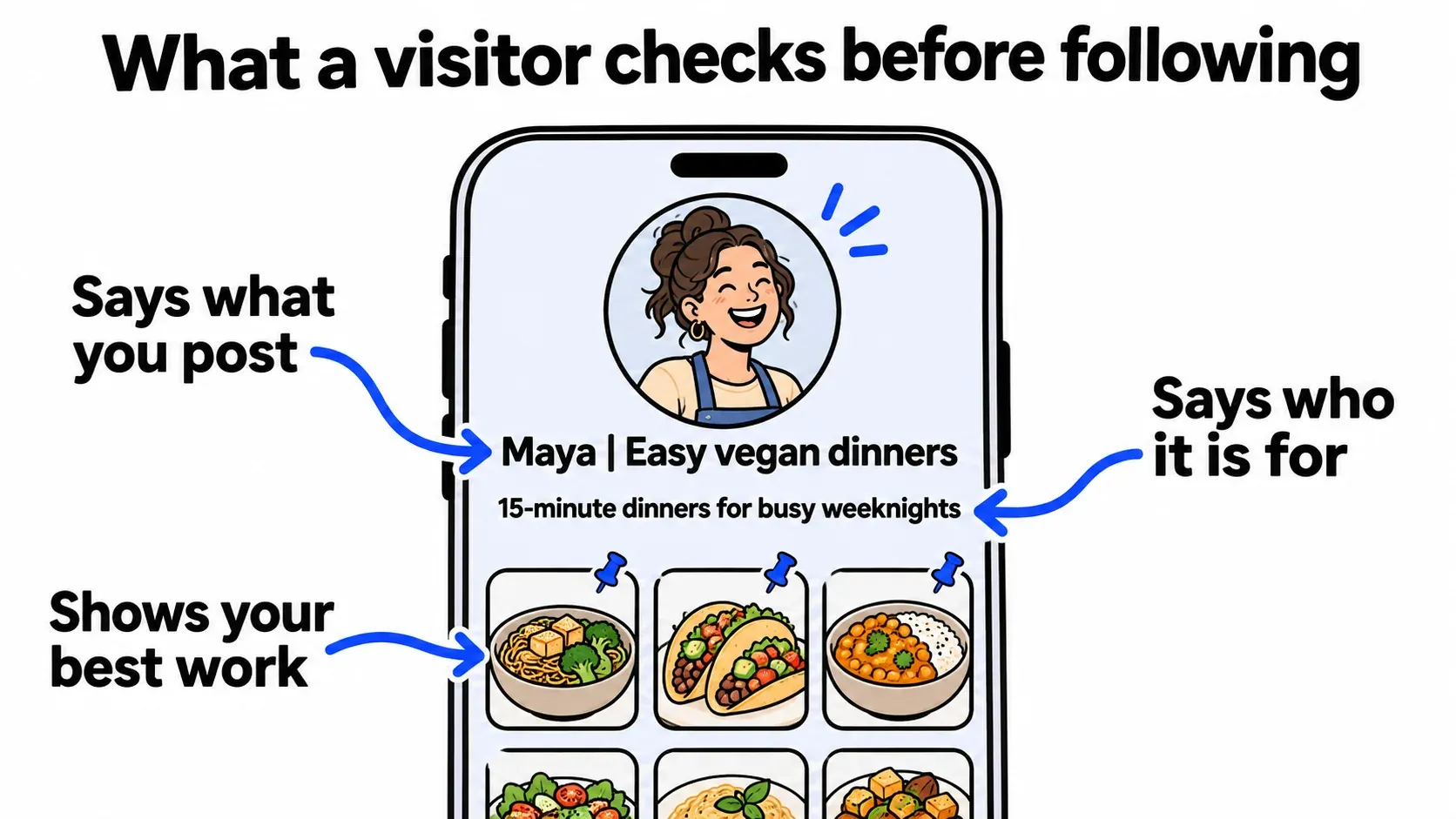
Check four things:
- Name field: Add your topic after your name, like “Maya | Easy vegan dinners.” It shows up in search, and it’s the first thing people read.
- Bio: Say who it’s for and what they get. “15-minute dinners for busy weeknights” beats “Food lover. Dreamer.”
- Pinned posts: Pin three posts on the topic people came for: one to start with, one that goes deeper and one that shows a result.
- Top two rows: Your recent posts should match the post that brought people in. If they came for a recipe and find six random selfies, most will leave.
Then test it. Show your profile to a friend for five seconds, then hide it. Ask what you post and who it’s for. If they can’t say, a stranger can’t either.
Give people a next post to wait for
The strongest reason to follow is a post someone wants to see next. Series do this well: “Part 2 tomorrow: the sauce.” “Day 12 of fixing my form.” “Next week I try the cheap version.”
Only say it if you’ll post it. This is also why a viral Reel can bring so few followers. Millions of people can enjoy one clip and see no reason to come back. A series gives them that reason.
How do you give every new post a strong start?
Help each post win its first test. You control the post. You don’t control how many followers are online when it goes live, or whether the people who’d love it land in that first group.
So a good post can stall at your usual wall for reasons that have nothing to do with the post. Here’s what improves the odds:
- Post when your followers are active. Insights shows the days and hours.
- Reply to early comments. Real conversation in the first hour adds to the reactions Instagram is measuring.
- Test ideas with trial reels. Trial reels go to people who don’t follow you first, and you get results in about a day. You need a public account with at least 200 followers if it’s a professional account, or 1,000 if it’s personal. Trial reels are ranked on their own, so a flop doesn’t hurt your regular Reels. Test one change at a time, like two hooks on the same video, then share the winner. Make each trial new: Instagram may limit one that repeats something you already posted.
- Collab with a creator your audience would like. A collab post shows up for both accounts’ followers, so it starts with two audiences instead of one.
- Give every post the same early push. GrowMyProfile promotes each new post the moment it goes live, to real people who don’t follow you yet. Each post starts with real views, likes and follows instead of waiting for them. That early engagement is the signal Instagram looks for, so every post gets a better shot at Explore and the Reels feed, not only the lucky ones.
That last point is what turns one good post into steady growth. Boosting a post helps the one post you pay for, and it runs as an ad. An account grows when every post gets past its first round. To see what an early start does for one post, try free Instagram likes on your next one.
Give every new post a head start
Each new post, promoted the moment it goes live to real people who don’t follow you yet. It starts instantly, and you can cancel anytime.
What holds an Instagram account back?
Anything that adds numbers without adding real people who react. Instagram learns from how people respond to each post, so people who never respond make every post look weaker.
Helps you grow
- Real people who watch, send and save
- Your own original posts
- A topic people can name in five seconds
- A strong first hour on every post
- An account that can be recommended
Holds you back
- Fake or bot followers
- Engagement pods and follow-for-follow
- Reposting other people's posts as they are
- Posts that go against the guidelines
- Starting over every time a post flops
Fake followers hurt twice. They never watch or like, which drags down the reactions Instagram measures. And a big count with low engagement makes brands suspicious. Meta bans fake accounts and fake engagement networks. Our guide to buying Instagram followers shows how to tell real followers from accounts nobody runs.
Engagement pods have a quieter problem. The same small group likes every post, whatever it’s about. That tells Instagram nothing useful about who your posts are for.
What should your next 30 days look like?
Run one focused test for a month. Keep your topic the same so you can tell what changed the result.
| Week | Do this | Decide this |
|---|---|---|
| 1 | Pull insights for your last 10 posts: non-follower views, skip rate, shares, profile visits and follows. | Which step loses the most people? |
| 2 | Fix your name field, bio and pins. Make three posts built to be sent. | Do profile visits turn into more follows? |
| 3 | Test two hooks on one idea with trial reels, or with two similar posts if you can’t use trials yet. | Which opening kept strangers watching past three seconds? |
| 4 | Start a short series on your best topic. Compare each post with older ones at the same age. | Keep the series, change one part, or try a new topic? |
How often should you post? Mosseri’s advice is to post as much as you can keep up without burning out. For most creators, that’s a few strong posts a week plus Stories. Three posts you learn from beat seven rushed ones.
Questions about growing on Instagram
How often should you post on Instagram to grow?
Instagram doesn't give a number. Adam Mosseri, who runs Instagram, says to post as often as you can keep up without burning out. For most creators, that's a few strong posts a week plus Stories. Use trial reels to test extra ideas without filling your followers' feeds. Then judge each week by follows per post, not by how many posts you made.
How long does it take to grow on Instagram?
There's no set timeline. One post that breaks out can bring hundreds of followers in a day, then nothing for weeks. Aim for steady growth from every post instead. Run a 30-day test like the one in this guide. Compare follows per post at the start and the end, and keep what moved the number.
Do hashtags still work on Instagram?
A little. Instagram is limiting posts to five hashtags, and Mosseri has said they don't do much for reach. They mostly help Instagram understand what a post is about. Clear words in your caption, name field and on-screen text do more, because Instagram search reads them.
Why do my Instagram Reels stop at the same number of views?
Instagram first shows a new Reel to a small group. If many of them skip it in the first three seconds, or few send it, it stops there. Check skip rate and shares in the Reel's insights. Then check Account status, because Instagram won't recommend your posts to people who don't follow you while your account is ineligible.
How do I get my first 1,000 followers on Instagram?
Pick one topic people can name, and put it in your name field and bio. Post Reels built for strangers, with the payoff first and something worth sending. Pin three posts that show what you do, and collab with a creator your audience likes. Switch to a free professional account. At 200 followers, a public one can use trial reels to test ideas on people who don't follow you yet.
Sources
Everything in this guide about how Instagram works comes from Instagram and Meta, or from reporting on what Instagram’s team has said.
- Instagram for Creators, Recommendations and originality
- Instagram for Creators, Rewarding original creators on Instagram
- Instagram for Creators, Original content guidelines
- Instagram for Creators, Introducing trial reels
- Instagram for Creators, The latest with Instagram
- Instagram Help Center, About trial reels on Instagram
- Meta Transparency Center, Instagram Reels ranking explained
- Meta Transparency Center, Inauthentic behavior
- Instagram, How Instagram search works
- Social Media Today, Instagram shares insights into its algorithm
- Social Media Today, Instagram chief shares algorithm insights and posting tips
- Social Media Today, Instagram’s implementing new limits on hashtag use
- Social Media Today, Instagram adds retention insights for Reels
- Social Media Today, Instagram adds new metrics for followers gained
Share this guide

Written by Gabriela Moreno
Gabriela writes our guides. We promote creators' new posts to real people who don't follow them yet, and she shares what we learn along the way. More guides