How the Instagram algorithm works, and why your views drop
What the Instagram algorithm looks at in each part of the app, why followers and new people judge your posts differently, and how to fix a drop in views.
 Gabriela Moreno14 min read
On this page
In short
- Feed and Stories mostly show people the accounts they follow. Reels and Explore mostly show accounts they don't follow yet.
- Instagram names three signals above the rest: watch time, likes per reach and sends per reach.
- Likes count a little more with your followers. Sends count a little more with people who don't follow you yet.
- New posts are tested on a small group first, then shown to more people if they do well. The first day matters most.
How does the Instagram algorithm work?
Most of the people who could love your next post have never seen your profile. The Instagram algorithm decides whether they ever do.
It’s a set of ranking systems, one for each part of the app. Each one guesses what a person is most likely to watch, like, send or save, and shows that first.
Two audiences judge every post
Every post you share is judged by two groups at once: the people who already follow you, and the people who don’t yet. Instagram weighs their reactions a little differently.
So when your views go flat, one of those groups stopped reacting. The fix depends on which one.
What You’ll Learn
- What each part of Instagram shows, and who sees your posts there
- The three signals that matter most, and how to track them post by post
- How a new post travels from a small test to people who don’t know you
- A five-step check for when your views drop
- Which common tips are myths, according to Instagram itself
Key takeaway
Write down each post’s numbers at 24 hours and again at 7 days. It’s the only way to tell a real drop from a slow start.
What does each part of Instagram show?
Each part of the app has its own ranking, built for a different job. Instagram’s own ranking explainer breaks it down like this:
| Where | Who it mostly shows | What it predicts |
|---|---|---|
| Feed | Accounts you follow, plus suggested posts | Stop, like, comment, share, profile tap |
| Stories | Accounts you follow | Tap in, reply or skip |
| Reels | Mostly accounts you don’t follow | Watch to the end, like, share, use the audio |
| Explore | Mostly accounts you don’t follow | Like, save, share, and how fast others react |
| Search | Matches for what you typed | Search words, then activity and popularity |
Reels and Explore are built mostly for people who don’t follow you. Feed mixes in some suggested posts, and Search depends on what people type.
You can see this split for any post. Open its Insights and look under Views. Instagram shows how much came from followers and how much from non-followers.
If almost all your views come from followers, your posts are being shown, but not recommended. Start with Account status and reused clips, step 1 in the views check below.
Explore has a few quirks of its own. Our guide to how the Instagram Explore page picks posts covers them.
Which signals does the Instagram algorithm weigh most?
Instagram names three: watch time, likes per reach and sends per reach. Adam Mosseri, the head of Instagram, called these the most important signals for ranking across the app, and told creators to track them.
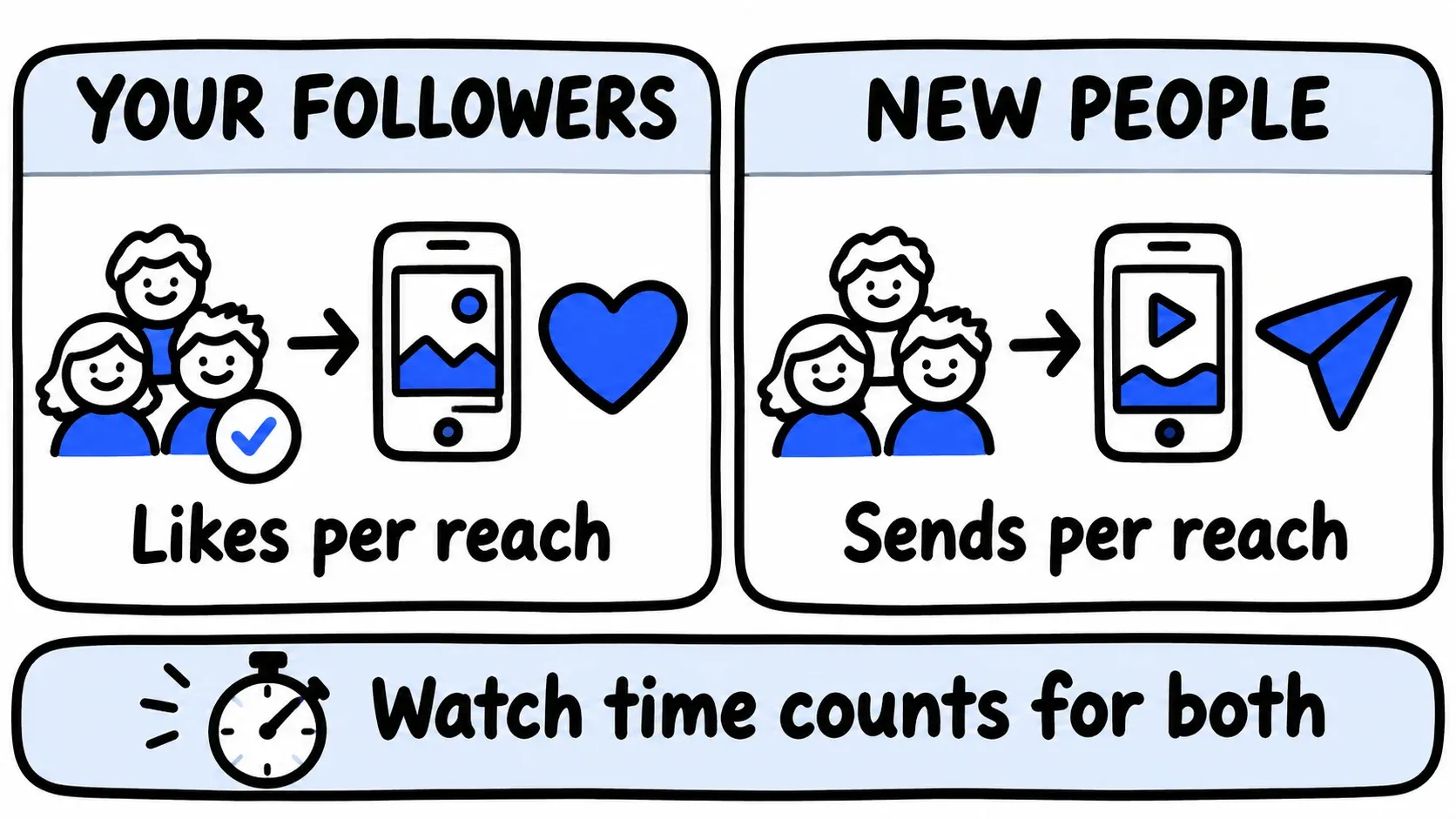
- Watch time is how long people keep watching. Meta’s Reels ranking card predicts whether you’ll watch more of a Reel than 95% of people who watched Reels of the same length. So a 60-second Reel is judged against other 60-second Reels, not against a 7-second clip.
- Likes per reach is the share of people who saw a post and liked it. It counts a little more with your followers.
- Sends per reach is the share of people who saw a post and sent it to someone in a message. It counts a little more with people who don’t follow you yet.
The first three seconds are their own signal
The same Reels card also predicts whether you’ll watch for less than three seconds. Instagram ranks on early swipes, so a slow intro costs you reach.
Your Reel insights show your skip rate: the share of viewers who swiped away in the first three seconds. Here’s what the fix looks like:
| Slow opening | Opens with the payoff |
|---|---|
| “Hey guys, today I’m making chicken.” | “Your chicken is dry because of this one step.” |
| “So I’ve been training legs for a while…” | “This one change added 20 kilos to my squat.” |
| “Welcome back! Today’s outfit is…” | “Three outfits from one pair of wide-leg jeans.” |
Why a smaller post can beat a bigger one
Instagram cares about the share of people who reacted, not the total. A post shown to 2,000 people with 200 likes did better than a post shown to 50,000 people with 300.
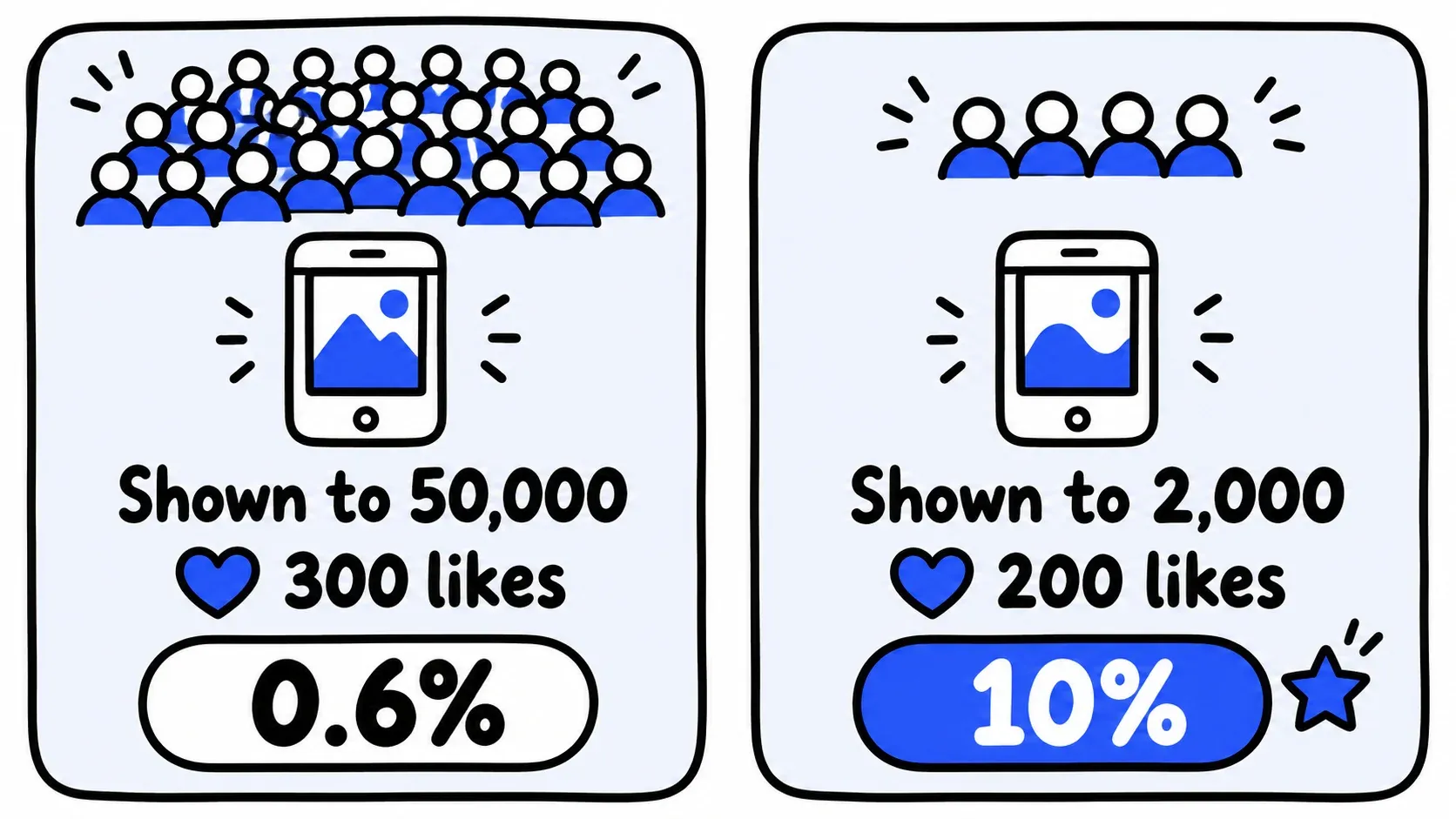
Insights gives you the raw counts. The ratio takes one line of math. Here’s a made-up Reel:
| Signal | The math | Example |
|---|---|---|
| Likes per reach | Likes ÷ accounts reached | 240 ÷ 6,000 = 4% |
| Sends per reach | Shares ÷ accounts reached | 90 ÷ 6,000 = 1.5% |
| Watch time | Average watch time ÷ length | 9 ÷ 14 seconds = 64% |
Shares is the closest number Insights gives you for sends. Check skip rate next to watch time too.
Track every post at 24 hours and 7 days
Insights shows a post’s totals so far. So last month’s post will always look bigger than yesterday’s, and you can’t go back and see what it had on day one. A simple log fixes that.
- At 24 hours, write down accounts reached, the share from non-followers, skip rate, likes, shares and follows.
- At 7 days, write the same numbers down again.
- Work out likes per reach and sends per reach for both days.
- Compare each new post with the median of your last ten. That’s the middle number when you line them up, so one viral post doesn’t skew it.
Skip the “good” numbers other guides quote. They mix niches, sizes and formats. Your own median tells you what changed for you.
Original posts get the reach
When Instagram finds the same content in more than one place, it shows the original and labels the copy. The rule covers photos and carousels too, not only Reels.
Instagram says original posts make up 75% of its recommendations in the US. An account that mostly reposts other people’s work can stop being recommended to non-followers. It becomes eligible again once enough of its posts from the last 30 days are original.
These don’t make a clip yours: a border, a new caption, a watermark, a speed change, or stitching clips together. If you cross-post your own videos, upload the clean file you exported, not a copy saved from another app with its logo on it. Our guide to TikTok’s unoriginal content flag has a cross-posting routine that works for Instagram too.
How does a new post reach people who don’t follow you?
A new post starts with a small test group and has to earn a bigger one. Instagram has said that posts it recommends are first shown to a small audience, whether or not those people follow you. If they react well, the post is shown to more people.
Instagram doesn’t publish how big that first group is, or how long the test takes. It has been clear about what it looks at:
- In Explore: how many people react to a post, and how quickly they do it
- In Reels: whether people watch to the end or swipe away in the first seconds
- Everywhere: how many of the people who saw it liked it and sent it
Trial Reels show you how new people react
Trial Reels go to people who don’t follow you first. They don’t show up for your followers in Feed or Reels, though a follower can still come across one through a message or an audio page. You see how they did after about a day. You can share a trial with your followers yourself, or let Instagram share it if it does well in its first 72 hours.
They’re the cleanest test you have, because your followers’ habits barely touch the result. You need a public account with at least 200 followers on a professional account, or 1,000 on a personal one.
Use trials to test one change at a time: two openings for the same idea, a tighter cut, a different first line on screen. A trial that stalls at a few hundred views usually means the first test group swiped away early. Check skip rate before you throw the idea out. The idea may be fine, and the opening may not be.
Trials have limits, though. They only work for Reels, you test one version at a time, and you wait about a day for the numbers.
Why a post’s first day matters
Fresh posts get a big share of recommendations. Meta has said that nearly 45% of the Reels it recommends are less than a day old, and over half of the suggested posts in Feed are too.
Many of your followers won’t open the app on the day you post, and many who do won’t scroll far enough to reach it. So a new post often meets only a slice of your followers, at whatever hour they happen to scroll.
The bigger pool is people who’d like your work but don’t know you yet. Reels and Explore are built to reach them, and a large share of what they recommend is less than a day old.
GrowMyProfile is built for that first day. We promote each new post the moment it goes live to real people who don’t follow you yet, so it starts with views, likes and follows from new people instead of waiting for them. That early engagement gives it a better shot at Explore and the Reels feed.
Viewers can steer their own feed
With Your Algorithm, people can see the topics Instagram thinks they like across Reels, Explore and Feed, and add or remove them. Meta has also said that every public Reel and Feed post is read by an AI model to understand its topic and tone.
So stick to a topic people can pick. If someone adds “home baking” to their topics, Instagram has to know your Reels are about home baking. Posts that jump between unrelated subjects are harder to match to anyone.
Why did your views drop?
Check five things in order, starting with the one that can block every recommendation.
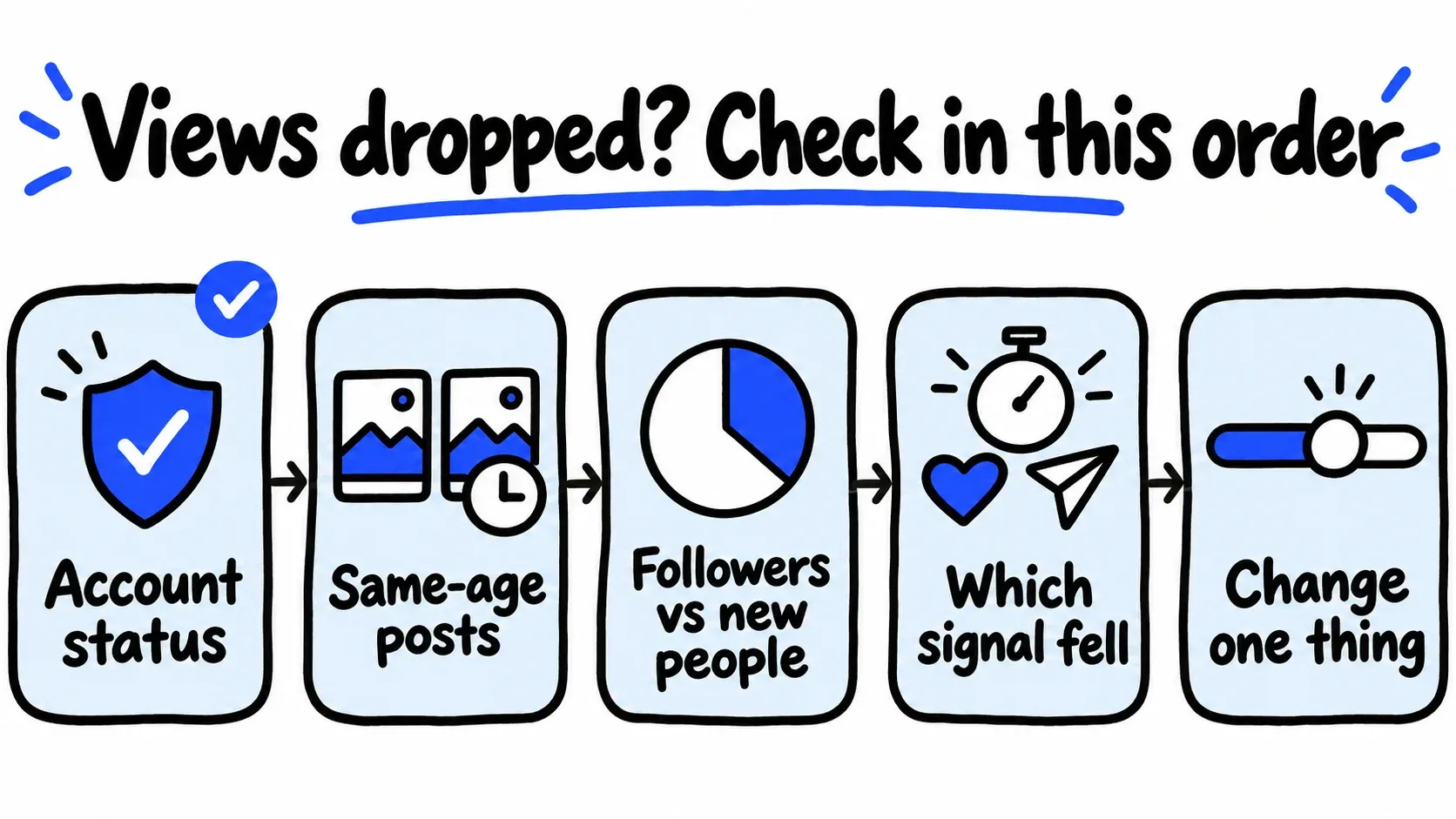
- Account status. Go to Settings, then More info and support, then Account status, and look at Limits to your reach. If your content can’t be recommended, Instagram won’t suggest it to people who don’t follow you. Low reach from non-followers is a reason to check, not proof of a restriction. If a post was flagged by mistake, open it and request a review. If the flags are reused clips, stop posting them. Our Explore guide covers Account status in more detail.
- Same-age posts. Use your 24-hour and 7-day log, not the totals on old posts. Use accounts reached, since views also count replays.
- Followers vs new people. Check where the views came from. Did your followers stop watching, or did the people who don’t follow you yet?
- Which signal fell. Compare skip rate, likes per reach and sends per reach with your median. One of them usually moved first.
- Change one thing. Pick the weakest signal and change one thing for your next few posts. Change three at once and you won’t know what worked.
Here’s how to read what you find:
| What you see | What it usually means | What to try |
|---|---|---|
| Almost no non-follower views on any post | Posts aren’t being recommended | Account status, then reused clips or other apps’ logos |
| Non-follower views fell, followers steady | New people swipe away or don’t send | Compare skip rate and sends with your median. Test a new opening as a Trial Reel |
| Follower views fell, new people steady | Your followers stopped reacting | Check likes per reach, and what changed in your topic or style |
| Only long Reels miss non-followers | They run over three minutes | Cut them to three minutes or less |
| Many swipe away in the first seconds | The opening isn’t landing | Lead with the payoff and cut the intro |
| Good watch time, few shares | People like it but don’t pass it on | Make posts a viewer would send to one friend |
| Plenty of views, few follows | No reason to come back | Pin your best posts on the topic and turn the idea into a series |
That last row matters for ranking too. Meta’s Reels card lists following the creator as one of the things it predicts, so a clear reason to follow helps the post, not only your follower count.
Sometimes it isn’t you
Mosseri has said Instagram ships small ranking changes every day, and big ones only rarely. He has also said most swings in reach come from seasons and events, not from a new algorithm.
Big changes do happen. Meta has described major Reels ranking updates on its earnings calls, including one that ranks Reels in sequences instead of one at a time. When creators across many niches report a drop in the same week, the change was probably on Instagram’s side.
Run the check anyway. If Account status is clear and your signals held up against your median, keep posting and compare again in two weeks.
Which Instagram algorithm tips are myths?
Most of what gets blamed for low reach never mattered, or stopped mattering. Here’s what Instagram has said about the usual suspects.
| What people say | What Instagram has said |
|---|---|
| “I’m shadowbanned.” | If your content can’t be recommended, Account status tells you why, and you can ask for a review. |
| “Use 30 hashtags.” | You can use five at most. They help Instagram understand a post, but they’re no longer a main way to reach people. |
| “Boosting a post kills organic reach.” | Instagram says it doesn’t suppress content to get people to buy ads. |
| “Posting too often gets you punished.” | The creators who gain the most followers post 10 or more Reels a month on average. |
| “There’s one best time to post.” | There’s no fixed time. Post when Insights shows your followers are most active. |
| “Watch lots of Reels in your niche first.” | Mosseri has said what you watch doesn’t change who sees your own posts. |
Reels, carousels or photos?
Instagram says its ranking doesn’t favor Reels over photos. It predicts which format each person likes, and shows them more of it.
What differs is where each format travels. The Reels feed is mostly made of accounts people don’t follow. Feed and Explore recommend photos and carousels too, and Meta’s Feed ranking card predicts whether someone will swipe through a whole carousel. So the first slide has to earn the swipe.
Pick the format that fits the idea. A step-by-step guide may work best as a carousel. A before-and-after may work best as a Reel. Then judge each post against your own posts in the same format.
What should you do before and after each post?
Before you post, fix the opening and give people a reason to send it. After you post, watch the first day.
Before you post
- Open with the payoff. Show the result, the problem or the question in the first second, like the openings above.
- Name the send. Picture the one person a viewer would send it to. A fitness creator might show the form fix a friend keeps getting wrong. A food creator might make the weeknight dinner someone wants to cook with their partner.
- Keep Reels for new people at three minutes or less. Instagram doesn’t recommend longer ones to non-followers.
- Upload your own clean files. No other app’s logo, no reposted clips.
- Team up with Collabs. Invite another creator as a collaborator. The post shows on both profiles, in front of both sets of followers.
After you post
- Post when your followers are around. Insights shows the hours they’re most active.
- Share it to your Story. Followers who missed it in Feed get a second way to find it.
- Reply to comments. Instagram’s creator FAQ suggests replying to comments in a post’s first week.
- Log it at 24 hours. If skip rate is high, test a new opening as a Trial Reel.
- Give it an early start with new people. To see what that does for one Reel, try free Instagram views on your next one.
Give every new post a head start
Each new post, promoted the moment it goes live to real people who don’t follow you yet. It starts instantly, and you can cancel anytime.
Questions about the Instagram algorithm
Why are my Instagram views so low?
Check Account status first. If your content can't be recommended, Instagram won't suggest it to people who don't follow you. If it's clear, compare your latest posts with your usual numbers at the same age, and see whether you lost views from followers or from people who don't follow you yet.
Why isn't Instagram showing my posts to my followers?
Many followers don't open the app on the day you post, and many who do don't scroll far enough to reach it. Feed also ranks by each follower's recent history with you, so followers who rarely react see you less often. Share each new post to your Story so followers who missed it in Feed can still find it.
How do I get my Reels shown to non-followers?
Post your own work, keep your account eligible for recommendations, and keep Reels at three minutes or less. Open with the payoff so people don't swipe away, and make something worth sending to a friend. Trial Reels let you test a Reel with non-followers before your followers see it.
Does Instagram punish you for posting too much?
Instagram hasn't said it does, and its own numbers point the other way. It says the creators who gain the most followers post 10 or more Reels a month on average, though it calls frequency one factor of many. If posting more means weaker openings or reused clips, people swipe away sooner and send less, and that costs reach.
How do I reset my Instagram algorithm?
To start your suggestions over, go to Settings, then Content preferences, then Reset suggested content. To adjust them instead, open Your Algorithm and add or remove topics. Both only change what you see. They don't change how your own posts are shown to other people.
Sources
Everything in this guide about how ranking works comes from Instagram and Meta, or from reporting on what Instagram’s team has said.
- Instagram, Instagram ranking explained
- Meta Transparency Center, Instagram Reels chaining AI system
- Meta Transparency Center, Instagram Feed AI system
- Instagram for Creators, Recommendations and originality
- Instagram for Creators, Rewarding original creators on Instagram
- Instagram for Creators, Original content guidelines
- Instagram for Creators, Trial reels
- Instagram Help Center, Trial reels
- Instagram for Creators, Frequently asked questions
- Instagram, Your Algorithm
- Instagram Help Center, Account status
- Instagram Help Center, Using hashtags
- Meta, Second quarter earnings call transcript
- Meta, Third quarter earnings call transcript
- Social Media Today, Instagram shares insights into its algorithm
- Social Media Today, Instagram chief answers creator questions
- Social Media Today, Mosseri on the Edits reach boost and engagement myths
- Meta, Trial reels: try content with non-followers first
Share this guide

Written by Gabriela Moreno
Gabriela writes our guides. We promote creators' new posts to real people who don't follow them yet, and she shares what we learn along the way. More guides