YouTube
How to get 4,000 watch hours on YouTube (and why paid ads don't count)
Which watch hours count for the YouTube Partner Program, why YouTube Promote and Google Ads don't move your Earn bar, and the retention math that gets you to 4,000 hours faster.
 Gabriela Moreno14 min read
On this page
In short
- Only valid public watch hours from public long-form videos and public live replays in the last 365 days count toward 4,000 hours. Shorts feed views, paid ads, and unlisted videos don't.
- Watch hours are a math equation: views times Average View Duration. Moving average watch time from 2 minutes to 8 cuts the views you need from 120,000 down to 30,000.
- YouTube Promote and Google Ads don't count toward Partner Program thresholds. Organic Follow-on Views from people who stay to watch another video do.
- Fix your first 30 seconds, cut mid-video dips, chain videos with topic playlists, and give every new upload real early viewers so recommendations pick it up.
How to get 4,000 watch hours on YouTube
You can upload every week, pass 1,000 subscribers, and still watch your Earn tab crawl backward.
To get 4,000 watch hours on YouTube, you need 240,000 minutes of valid public watch time on long-form videos inside a rolling 365-day window. The fastest way to cross that line isn’t chasing random view spikes or paying for YouTube ads. It’s raising how long each viewer stays, chaining videos together, and putting every new upload in front of real people early.
Why your Earn tab moves slower than your analytics
If you already check YouTube Studio every week, you’ve probably run into the strangest part of the climb. Your Analytics overview says your channel hit thousands of watch hours, yet the Earn tab sits way lower, freezes for days, or drops overnight.
Most creators blame the algorithm or assume a bug hit their account. Usually, one of three mechanics is eating their hours: old hours rolling off the 365-day window, traffic sources that don’t qualify (like Shorts and paid ads), or hidden leaks in audience retention that kill videos before minute three.
What You’ll Learn
- Which watch hours count for the YouTube Partner Program, and why Studio Analytics shows a bigger number than the Earn tab
- Why paid ads through YouTube Promote and Google Ads don’t count (plus the one organic exception most creators miss)
- The views-by-retention math that cuts the traffic you need by 75%
- How to read Key moments for audience retention and Traffic source AVD to find and fix drop-offs
- Three watch-hour engines that stack minutes fast: evergreen search videos, topic playlists, and public live replays
- How to get real early viewers on every new upload without risking your channel
Warning
Starting February 1, 2027, YouTube’s Partner Program threshold update raises both ad-revenue entry paths for new applicants: 8,000 valid public watch hours in 365 days or 20 million valid public Shorts views in 90 days, alongside 1,000 subscribers. The fan-funding tier stays at 3,000 watch hours (or 3 million Shorts views) with 500 subscribers, and channels already accepted keep their status. Check your Studio Earn tab and YouTube’s Partner Program eligibility page to confirm the bar that applies when you apply. Every strategy in this guide works the same way whether your target is 4,000 or 8,000 hours.
Which watch hours count toward the YouTube Partner Program?
YouTube only counts valid public watch hours earned on public long-form videos and public live replays during the last 365 days. Any watch time outside those rules still appears in your general Analytics totals, then gets stripped out before it reaches the Earn tab.
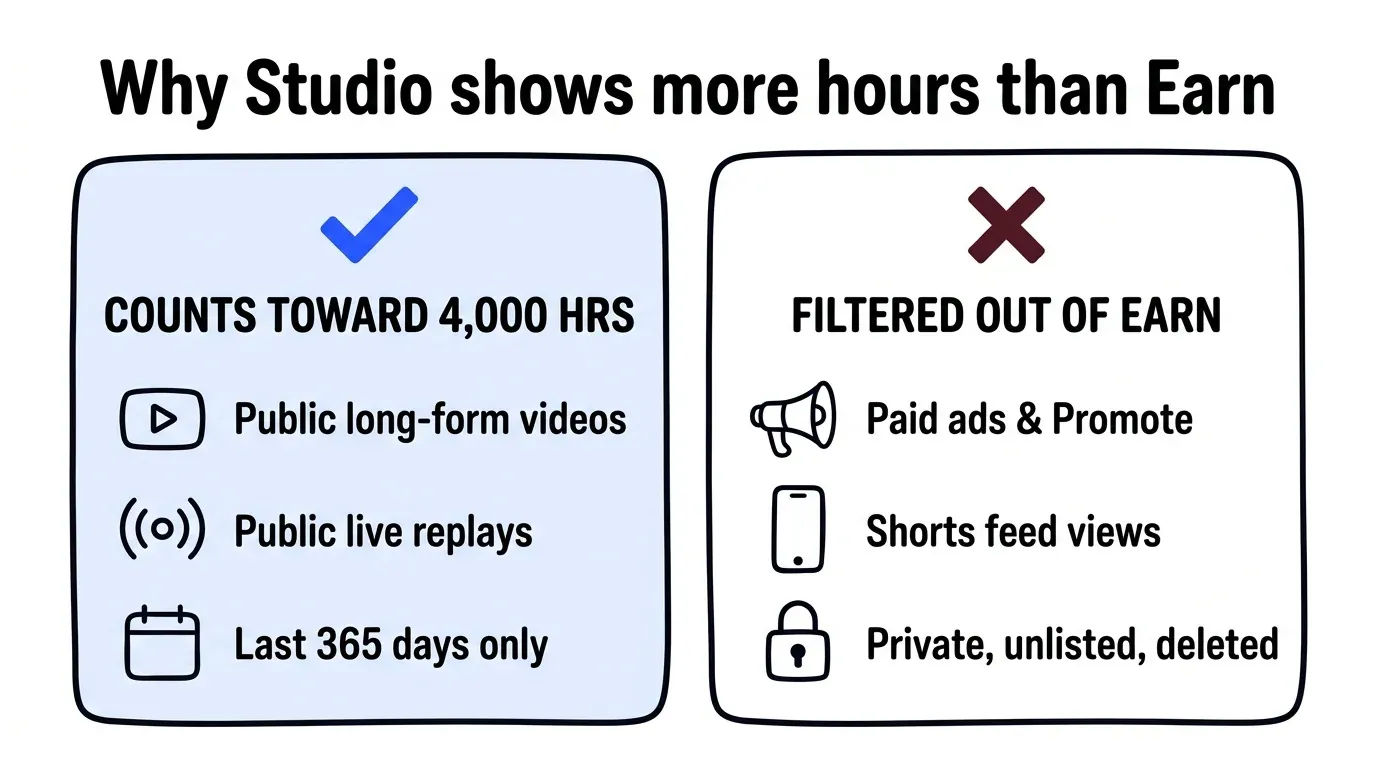
YouTube’s Partner Program eligibility rules spell out what qualifies and what gets left out:
Counts toward 4,000 hours
- Public long-form videos watched organically
- Public live streams kept public as replays
- Public Premieres kept public after airing
- Organic Follow-on Views after someone clicks an ad
- Viewing time from the last 365 days only
Filtered out of the Earn tab
- Paid ad campaigns (YouTube Promote and Google Ads)
- YouTube Shorts watched in the Shorts feed
- Private, unlisted, or deleted videos
- Live streams that are unlisted, deleted, or not saved as VODs
- Watch hours older than 365 days
Why your Studio Analytics number is higher than your Earn tab
This gap causes more panic on creator forums than almost any other metric on YouTube. Four things explain almost every mismatch:
- The rolling 365-day window. YouTube does not measure lifetime watch hours. Every single day, hours earned 366 days ago expire. If one video spiked a year ago and brought 60 hours a day that week, your Earn bar will drop unless your channel earns more than 60 new hours a day right now.
- Earn tab verification lag. Standard Analytics updates in 24 to 48 hours. The Earn tab lags behind by several days, and sometimes a full week or more after a traffic spike, while YouTube checks views for spam and invalid traffic.
- Shorts and ads stay in Overview. A Short that pulls 300,000 views can add thousands of watch hours to your Overview dashboard while adding zero to your 4,000-hour bar. Shorts follow a separate ad-revenue Partner Program track: 10 million valid public Shorts views in 90 days before February 1, 2027, rising to 20 million for new applicants on that date.
- Unlisting old videos wipes their hours. Creators often set older, rough videos or past live streams to Unlisted to tidy up their channel page. The second a video stops being public, every watch hour it earned disappears from your Earn total. Flip it back to Public and those hours return.
Key takeaway
Never unlist, privatize, or delete older videos or live replays while you are climbing toward monetization. Even an awkward early video pulling 2 hours a week is free fuel for your Earn bar.
Why don’t paid ads count toward 4,000 watch hours?
YouTube leaves paid ad watch time out of Partner Program thresholds because the program tests whether your channel can hold an organic audience without paying for every click. Paying Google for views boosts your public view counter, not your Earn tab.
Both of Google’s built-in ad tools have the same hard limit:
- YouTube Promote turns a video you pick into a Google ad right inside Studio. YouTube’s Promote guide is blunt: subscribers and watch hours gained through Promote don’t count toward Partner Program thresholds, and running a promotion doesn’t change how YouTube recommends your videos organically. Our breakdown of how YouTube Promote works covers its budgets, review times, and limits in detail.
- Google Ads (Video views and Demand Gen campaigns) sells views by auction. With cost-per-view bidding, a TrueView view counts after 30 seconds of an in-stream ad or a click. Those views show up on your public video counter, then get filtered right out of your Partner Program watch hours. See our Google Ads for YouTube comparison for how its bidding and billing work.
The hidden retention trap with paid ads
Even worse than not counting, broad paid ads often mess up your data. Viewers who get interrupted by an ad didn’t search for your topic or choose your thumbnail. Many swipe away or click Skip inside 20 seconds.
In YouTube Analytics, that flood of short ad views drags down your video’s blended Average View Duration and audience retention curve (organic thumbnail CTR stays separate, since YouTube excludes TrueView discovery ads from thumbnail impressions). You end up staring at a muddy retention graph, unable to tell whether your script failed or the ad targeting pulled the wrong crowd.
The one exception: organic Follow-on Views
Most guides miss one nuance in YouTube’s documentation. Direct ad watch time never counts, but Follow-on Views do.
If someone sees a promotion, clicks onto your channel, and then organically chooses to watch a second public long-form video, the watch time from that second video counts like any other organic view. YouTube even tracks Follow-on Views inside Studio for Audience growth promotions.
Still, running paid ads hoping for second-video clicks is an expensive, clunky path to 4,000 hours. You pay per click or view, wait 1 to 2 days for ad policy review, and repeat the whole budget, targeting, and end-date setup on every upload.
| Approach | Counts toward YPP? | Effect on analytics | Risk to channel | Work per upload |
|---|---|---|---|---|
| YouTube Promote / Google Ads | No (only organic Follow-on Views count) | Often lowers blended AVD and retention | Safe policy-wise, wastes budget if chasing YPP | High: new budget, targeting, and ad review each video |
| Cheap “4,000 hours” bot packs | Stripped when caught | Unnatural looped playback spikes | High: violates Fake Engagement Policy, risks rejection | Low upfront, high cleanup risk |
| Strong retention + real early viewers | Organic views and watch time count | Builds real watch-time and satisfaction signals | Safe when viewers are real humans | Focus stays on making better videos |
How many views do you need for 4,000 watch hours?
4,000 watch hours equals 240,000 minutes, and your Average View Duration decides whether that takes 120,000 views or 20,000 views. Chasing more clicks while people leave at minute two is the hardest way to play the game.
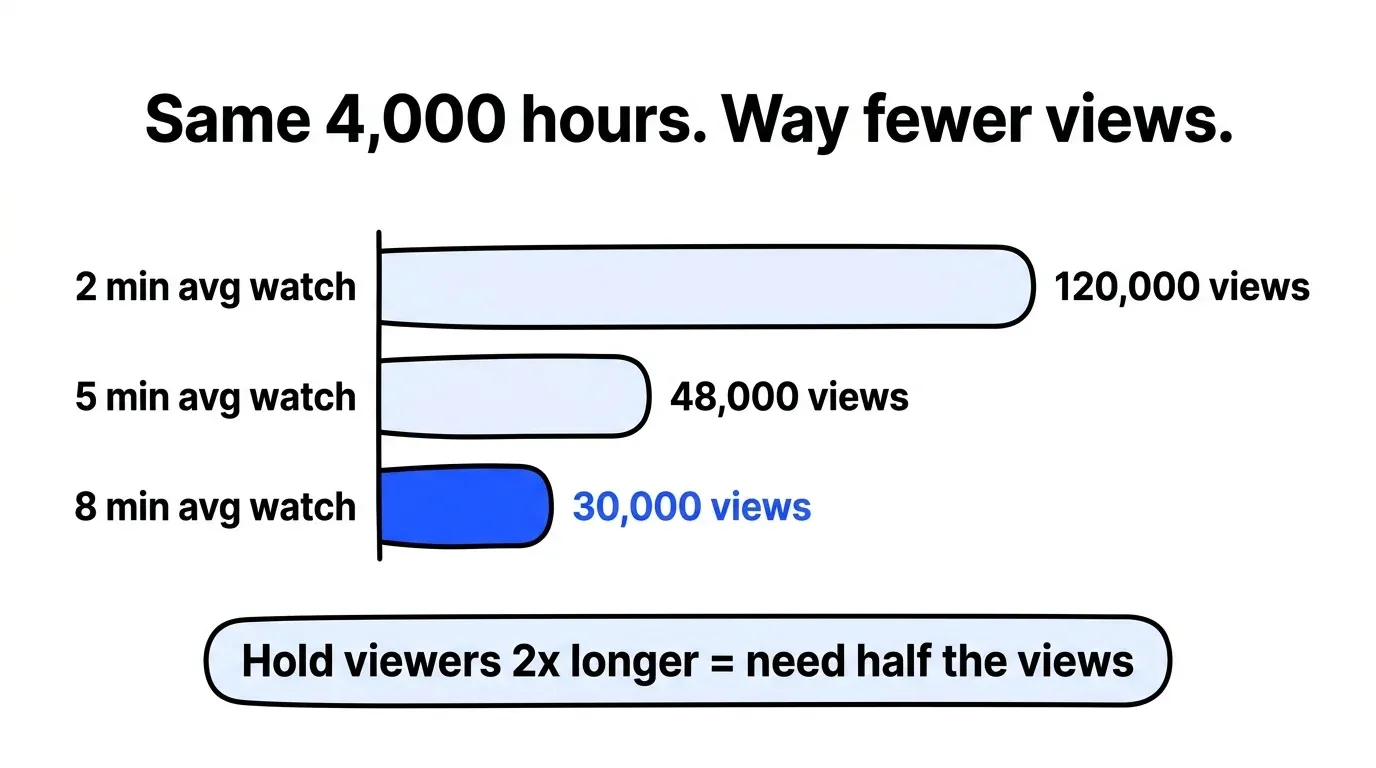
Look at how fast the required views drop as Average View Duration climbs:
| Average View Duration | Total views for 4,000 hours | Views per week (6-month goal) | Views per week (12-month goal) |
|---|---|---|---|
| 2 minutes | 120,000 | 4,615 | 2,308 |
| 4 minutes | 60,000 | 2,308 | 1,154 |
| 6 minutes | 40,000 | 1,538 | 769 |
| 8 minutes | 30,000 | 1,154 | 577 |
| 12 minutes | 20,000 | 769 | 385 |
Notice what changes at 8 minutes. You no longer need a viral breakout. A channel uploading one solid long-form video a week only needs about 1,150 views per week across its entire catalog to clear 4,000 hours in six months.
The session-time multiplier most creators ignore
YouTube’s recommendation system doesn’t judge a video by clicks alone. It tracks watch time and viewer satisfaction (which YouTube calls “valued watch time,” measured partly through viewer surveys) across an entire session.
Here is the math of a simple two-video chain. Suppose your videos average 6 minutes of watch time, so you’d normally need 40,000 views. Now suppose 1 in 3 viewers clicks your end screen or playlist and watches a second video for another 6 minutes.
Your watch time per visitor jumps from 6 minutes to 8 minutes. That single habit cuts the unique viewers you need from 40,000 down to 30,000 without needing one extra impression from the Home feed.
Track your real net weekly pace
To measure true progress toward monetization, log your Earn tab watch hours every Sunday. Actual net weekly gain = this Sunday’s Earn total minus last Sunday’s Earn total. Because the Earn tab already strips out Shorts, paid ads, private videos, and expired days, weekly Earn snapshots give you the real number.
Want a rough heads-up on whether a big spike from last year is about to roll off? Open Analytics, go to Watch time, switch to Last 365 days, and glance at the oldest 30 days on the far left. Treat that Analytics number as an approximate estimate only, because general Analytics still mixes in Shorts and paid ad views that were never in your Earn total.
How do you fix retention drops using YouTube Studio?
Open Engagement, then Key moments for audience retention on your last five long-form videos and compare each curve against Typical performance. That chart marks the exact timestamp where viewers get bored, so you fix the real leak on your next edit instead of guessing.
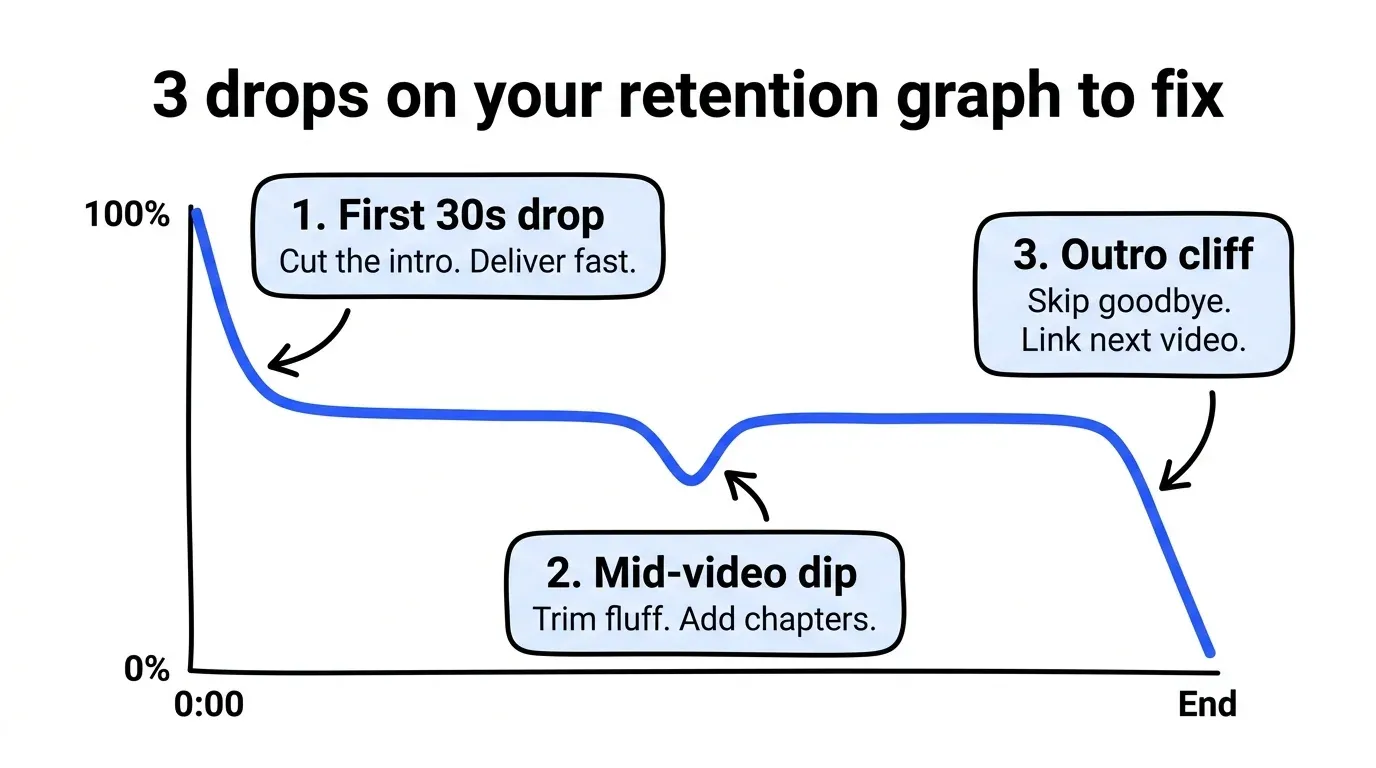
YouTube’s Key moments for audience retention report shows up on videos that are at least 60 seconds long with 100+ views. Pair it with YouTube’s engagement metrics (Average View Duration and Average Percentage Viewed) and read the four shapes it flags:
| What the graph shows | What went wrong | How to fix it on your next upload |
|---|---|---|
| Steep drop in the first 30 seconds | Your title and thumbnail promised one thing, and your opening did slow backstory, a channel intro, or “hey guys” | Confirm the title’s exact promise in sentence one. Show the finished result, mistake, or stake inside 10 seconds, then explain how you got there. |
| Sharp mid-video dip | A tangent, repetitive recap, or unbridged ad read broke the pace | Cut explanations that repeat what you already proved. Add clear chapters so impatient viewers skip ahead inside your video instead of leaving the page. |
| Upward spike | Viewers rewound or jumped straight to a dense step, diagram, or timestamp | Turn that exact moment into its own 10-minute deep-dive video. Your audience just handed you a proven topic. |
| Vertical cliff in the last 30 seconds | You said “So that’s it for today, thanks for watching, like and subscribe” | Never announce the ending. Bridge straight from your last point into the next problem and drop one matching end-screen video over the final 15 seconds. |
Why your last 20 seconds matter as much as your first 30
Watch the end of your retention graph on any video where you gave a standard wrap-up. The moment viewers hear “so in conclusion” or “let me know in the comments,” the curve falls off a cliff. Half your audience closes the tab before your end screen even appears.
Instead, end on an open problem your next video solves: “Now that your lighting looks clean, bad audio will stand out twice as much. Click this video next to fix room echo in five minutes.” Keep one video tile on screen, not three. One clear next step earns far more clicks than a crowded menu.
Split your retention by traffic source in Advanced Mode
Before you throw out a video topic because its Average View Duration looks low, check one hidden report in YouTube Studio. Open the video, click Analytics, click Advanced mode in the top right, and switch the breakdown to Traffic source.
Look at Average view duration row by row across YouTube search, Browse features, Suggested videos, and External. A tutorial might average 7:40 from YouTube search and 1:30 from External shares, leaving a blended average of 3:20 on the main screen. If you read only the blended number, you’ll kill a topic that is quietly printing watch hours in search.
Don’t pad video length to fake watch hours
Stretching a 7-minute tutorial into 20 minutes of slow rambling backfires twice. Viewers feel the padding, drop out early, and give low ratings when YouTube pops up a post-watch satisfaction survey.
A tight 10-minute video that holds 55% (5.5 minutes AVD) beats a bloated 20-minute video that holds 20% (4 minutes AVD). Even better, the tighter video keeps getting recommended because viewers finished glad they clicked.
Which video formats stack watch hours fastest?
Build your catalog around three long-form engines: evergreen search tutorials, bingeable topic playlists, and public live replays, then use Shorts only as bridges into long videos. Each format pulls watch hours from a different part of YouTube, so your progress doesn’t stall when one video cools off.
1. Evergreen search videos that solve one specific problem
Trending videos spike for 48 hours and go quiet. Evergreen tutorials, gear teardowns, comparisons, and troubleshooting guides earn watch hours every single day for months.
Search viewers also watch differently than casual Home-feed browsers. Someone searching “how to fix crackling mic audio in OBS” isn’t killing time. They stay until the crackle stops.
Type your core topic into YouTube’s search bar and scan the autocomplete phrases (the same long-tail method we use in our keyword research guide). Narrow broad ideas until one specific viewer feels seen:
- Broad: “Morning routine for productivity” (competes with huge channels, attracts casual skimmers)
- Specific: “My 6am desk setup and sprint routine for freelance designers” (fewer rivals, viewers who watch past minute eight)
2. Topic playlists built like TV seasons
Random playlists named “Vlogs” or “All Uploads” barely move watch time. Strategic playlists turn one view into three.
Set up two or three focused playlists this week:
- Group by viewer journey, not upload date. Put 4 to 8 videos in the exact order someone needs to solve a problem from start to finish.
- Lead with your highest-retention video. Put your proven winner in slot one so new viewers get hooked before video two autoplays.
- Name playlists with searchable phrases. Playlists rank in YouTube Search. “Beginner Podcast Audio Fixes” gets found; “Audio Stuff” doesn’t.
- Share the playlist URL, not the bare video link. Whenever you link a video in your description, pinned comment, or end screen, use the link with
&list=at the end. When video one finishes, YouTube autoplays your next video instead of handing the viewer to another channel. - Pin a “Start Here” playlist at the top of your channel home. New visitors who tap your channel name shouldn’t have to hunt for what to watch next.
3. Public live streams (kept public afterward)
Live streaming is the most underused watch-hour accelerator for serious channels. One 90-minute Q&A, live teardown, build-along, or coaching stream with 30 steady viewers adds 45 watch hours in a single afternoon.
Two habits separate live streams that build your Earn bar from ones that waste your time:
- Keep the replay public. Every live hour and every future replay hour counts as long as the VOD stays public. Unlisting the stream afterward erases all of it.
- Trim the dead warm-up in Studio Editor. Right after the stream ends, open YouTube Studio’s built-in Editor and slice off the first 3 to 5 minutes of “can you hear me, waiting for chat to load.” Replay viewers judge your VOD like a regular upload, and a slow warm-up wrecks retention.
4. Use Shorts as bridges, never as watch-hour engines
Stop expecting a viral Short to push your 4,000-hour bar. It won’t.
Instead, use Shorts for what they do best: putting your topic in front of strangers fast. Clip one sharp 35-second payoff from your latest long-form video, export the clean master file with no other app’s watermark (see our cross-posting workflow if you share across platforms), and link the full video inside YouTube Studio’s Related Video field. Even a 2% click-through from a 20,000-view Short sends 400 warm, high-intent viewers straight into your long-form watch time.
How do you get real early viewers on every new long-form upload?
Even a tight, well-edited long-form video needs real early viewers so YouTube can measure clicks, watch time, and viewer satisfaction. Without that early response, great evergreen tutorials often sit at 40 views for weeks while YouTube waits for a signal.
YouTube’s Search and Discovery system tests a new upload on an initial wave of viewers: subscribers who watched you recently, plus a small slice of Browse or Search traffic. When those first viewers click and stay, YouTube expands impressions across the Home feed and Suggested videos.
That creates a real bottleneck on growing channels. Most of your subscribers aren’t online the hour you publish, and search-focused videos can take months to climb on their own because they lack early watch-time signals.
Four practical ways give every upload a stronger first week:
- Publish right before your audience peaks. Open Studio, go to Audience, check When your viewers are on YouTube, and publish about an hour before the darkest purple bars.
- Send warm traffic from your own back catalog. Open your three highest-traffic videos from the last 28 days and point their pinned comments and end screens to your brand-new upload.
- Reply to early comments fast. Answering questions in the first few hours pulls commenters back onto the watch page and sparks more conversation under the video.
- Put every new upload in front of real non-subscribers automatically. GrowMyProfile detects each new video the moment it goes live and promotes it to real people on YouTube who haven’t subscribed yet. You don’t set up a new ad campaign, bid, or review per video. Every upload starts building early views, likes, gradual watch time, and new subscribers on its own so recommendations have real activity to learn from on the Home feed and Suggested videos.
Be clear-eyed about what promotion can and can’t promise. No service can guarantee YouTube Partner Program approval or promise that bought watch hours will count toward monetization, because YouTube decides what qualifies and reviews every channel that applies. If you want to compare real gradual viewing time against shady looped-player packs, our guide to buying YouTube watch hours walks through every red flag to watch for. Need the subscriber side of the bar too? See how real YouTube subscribers build alongside watch time. And if you want to see real viewing time on one upload before committing to anything, you can test 10 free YouTube watch hours on your latest public video with no card and no password.
Give every new upload a head start
Each new video, promoted the moment it goes live to real people who haven’t subscribed yet. Starts instantly, no password needed, and cancel anytime.
What gets channels rejected or stripped of watch hours?
Anything that adds watch time without real people choosing to watch violates YouTube’s Fake Engagement Policy and puts your monetization review at risk. Plenty of channels clear 4,000 hours on paper, then get denied or stripped when YouTube’s automated checks and human reviewers inspect the channel.
Builds lasting watch hours
- Real people watching public long-form videos and live replays
- Hours that climb gradually week after week
- Original commentary, teaching, or creative editing
- Keeping older watch-hour videos public
- Clear topic playlists and bridged end screens
Risks rejection or removed hours
- Cheap "4,000 hours in 48 hours" bot or click-farm packs
- Looped playlists running overnight on your own devices
- Watch-for-watch groups trading muted background tabs
- Unedited reposts or reused compilations of other creators
- Unlisting or deleting older videos right before applying
Four mistakes cause almost every rejection or sudden drop:
- Looped watch-hour packs. Sellers who promise 4,000 hours in two days run one long video on repeat inside headless browsers or bot panels. YouTube’s Fake Engagement Policy bans artificial watch time, removes invalid hours, and can terminate repeat offenders.
- Self-looping and watch-for-watch groups. Playing your own playlist overnight on spare browsers or trading muted tabs in Discord leaves identical IP, session, and flat-retention footprints that YouTube’s filters strip out.
- Reused content at review. Hitting 4,000 valid hours only unlocks the application button. Human reviewers still check your channel’s main theme, top-viewed videos, and newest uploads. Clips compiled from other channels without clear original value get rejected even with 10,000 valid hours.
- Cleaning house before clicking Apply. Hiding old videos you feel embarrassed by can drop your valid public hours back below the threshold overnight. Leave them public until well after you’re accepted and your newer catalog carries the weight.
What should your next 30 days look like?
Run one focused 30-day sprint where every upload fixes one retention leak and feeds one topic playlist. Measuring weekly net progress keeps you focused on what moves the Earn bar.
| Week | Do this | Check this |
|---|---|---|
| 1 | Pull Key moments for audience retention on your last 5 long videos. Write down your median AVD and log your starting Earn tab watch hours. | Which drop spot (first 30 seconds, mid-video dip, or outro) leaks the most minutes? |
| 2 | Film and edit two long-form uploads fixing that one leak. Add chapters and replace your goodbye with a bridged next-video pitch and one end screen. | Did 30-second retention and AVD beat your channel’s Typical curve? |
| 3 | Build two topic playlists (4 to 8 videos each, best video first). Update descriptions and end screens on your top 5 traffic videos to use playlist URLs. | Did average views per viewer rise in Studio Analytics? |
| 4 | Publish one specific evergreen search tutorial and host one 60-minute public live stream. Trim the live warm-up afterward and leave the replay public. | Did your weekly Earn tab snapshot rise faster than in Week 1? |
Two focused long-form uploads a week that hold viewers for 8 minutes beat five rushed videos people leave at minute one. Watch hours compound when viewers finish one video and immediately start the next.
Questions about getting 4,000 watch hours on YouTube
Why are my YouTube watch hours going down or not updating?
Three things cause this. First, YouTube counts a rolling 365-day window, so hours older than a year drop off every day. Second, the Earn tab lags several days to a week behind Studio Analytics while YouTube filters invalid traffic. Third, unlisting, privatizing, or deleting any video removes its watch hours from your Earn total right away.
Do YouTube Shorts count toward 4,000 watch hours?
No. Watch time from the Shorts feed never counts toward the long-form watch hours requirement. Shorts have a separate Partner Program ad-revenue path (10 million valid public Shorts views in 90 days before February 1, 2027, rising to 20 million for new applicants on that date). Use Shorts to reach new viewers, then attach a Related Video link to send them into your public long-form videos.
Do YouTube Promote or Google Ads watch hours count toward monetization?
No. YouTube excludes watch hours, subscribers, and Shorts views gained directly from ad campaigns when checking Partner Program eligibility. The one exception is Follow-on Views: if someone discovers your channel from a promotion and then clicks another video organically, that organic watch time counts.
Do live streams count toward 4,000 watch hours on YouTube?
Yes, as long as you stream publicly and keep the recorded replay public after it ends. Unlisting, privatizing, or deleting a past live stream wipes out every watch hour it earned. Trim the warm-up intro in YouTube Studio afterward so replay viewers don't leave in the first 30 seconds.
How long does it take to get 4,000 watch hours on YouTube?
There is no fixed timeline because watch hours depend on views multiplied by Average View Duration. At 2 minutes per view, you need 120,000 views. At 8 minutes per view, you only need 30,000. Channels that combine evergreen search tutorials, topic playlists, and public live replays usually get there far faster than channels waiting on one viral video.
Sources
Everything in this guide about Partner Program rules, paid promotions, retention reports, and recommendations comes from official YouTube and Google documentation.
- YouTube Help, YouTube Partner Program overview and eligibility
- YouTube Help, YouTube Partner Program eligibility threshold updates
- YouTube Help, Get started with YouTube Promote
- Google Ads Help, About YouTube’s cost-per-view (CPV) bidding
- YouTube Official Blog, On YouTube’s recommendation system
- YouTube Help, How YouTube Search and Discovery works
- YouTube Help, Measure key moments for audience retention
- YouTube Help, Understand your YouTube engagement metrics
- YouTube Help, Add end screens to videos
- YouTube Help, Fake engagement policy
Share this guide

Written by Gabriela Moreno
Gabriela writes our guides. We promote creators' new posts to real people who don't follow them yet, and she shares what we learn along the way. More guides