YouTube
Is YouTube Promote worth it? Cost, watch hours, and what actually counts
What YouTube Promote costs, which views and watch hours count toward monetization, how to read your analytics after a campaign, and smarter ways to reach new viewers.
 Gabriela Moreno14 min read

On this page
In short
- YouTube Promote is worth it only when you have a clear job for one proven video, like driving website clicks or testing a strong gateway episode in a single market.
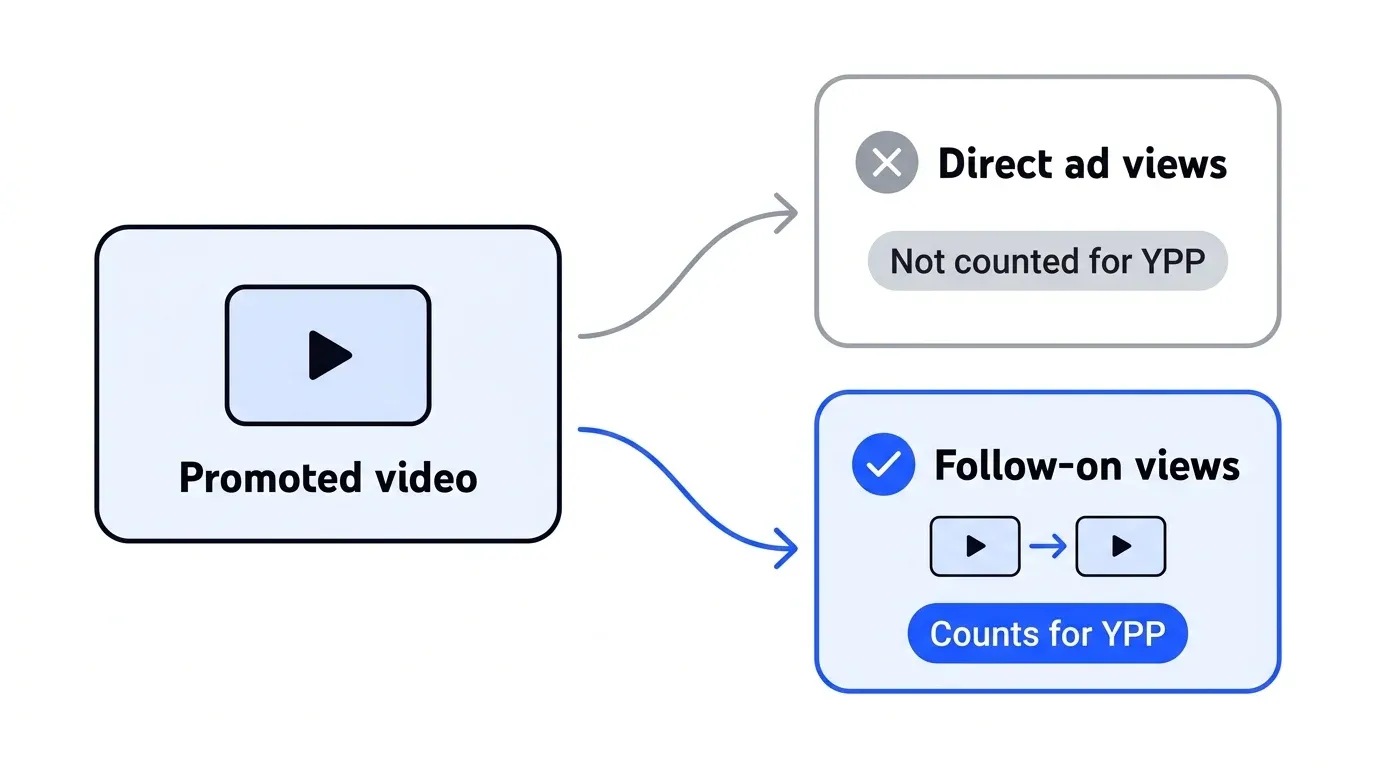
- Direct watch hours, Shorts views, and subscribers from Promote do not count toward the YouTube Partner Program. Organic Follow-on Views when viewers click a second video do count.
- Mixing high-cost countries with cheap ad markets in one promotion drains your budget into low-intent clicks before your target viewers ever see the video.
- Because Promote requires a new setup, budget, and up to two-day review on every upload, it breaks down fast once you post on a weekly schedule.
Is YouTube Promote worth it?
YouTube Promote buys real views and subscribers fast, and still leaves you zero hours closer to monetization.
For a serious creator trying to grow a channel week after week, the Promote button inside YouTube Studio is rarely worth the spend on its own. It works when you treat it like a paid ad for one specific video with a clear next step, such as sending viewers to an offer, testing a proven topic in a single country, or feeding people into a second bingeable video.
It fails the moment you use it to buy Partner Program watch hours, rescue a slow upload, or replace steady discovery across every video you publish.
Who gets burned by the Promote button
Most creators who complain about YouTube Promote on Reddit made one of three avoidable mistakes. They spent money chasing monetization hours that YouTube excludes, they targeted ten countries at once and bought cheap clicks from the wrong audience, or they stared at a blended retention chart and panicked.
None of those outcomes mean paid reach cannot work on YouTube. They mean the Promote tab hides the ad mechanics that decide whether your money buys future viewers or empty numbers.
What You’ll Learn
- What YouTube Promote does under the hood and where it stops short of full Google Ads.
- Exactly which views, watch hours, and subscribers count toward monetization, plus the Follow-on View path most guides miss.
- What Promote costs by country and goal, including the mixed-country auction trap and Google Ads billing rules.
- How to read YouTube Analytics after a campaign so ad traffic never masks your real organic retention.
- A clean five-step test plan if you still want to try Promote without wasting your budget.
- How regular uploaders get early momentum on every video without rebuilding ad campaigns every time they hit publish.
Key takeaway
Judge YouTube Promote by what viewers do on your next video, not by the view spike on the promoted one.
What does YouTube Promote actually do?
YouTube Promote is a simplified Google Ads wrapper built into YouTube Studio that turns one public or unlisted video into a paid ad. You pick a goal, an audience, a total budget, and an end date, and Google runs your video across YouTube placements until the budget runs out or the end date hits.
You set it up in YouTube Studio on desktop or through the YouTube and Studio apps on Android. Channel owners, managers, and editors can launch promotions as long as a Google Ads account with active billing is linked, and the video or Short is at least 10 seconds long and passes Google Ads policy checks. YouTube outlines those rules in its guide to getting started with YouTube Promote.
Every promotion gives you three goal choices. Each goal optimizes for a different viewer action:
| Promote goal | What Google optimizes for | What Studio reports | Best use case |
|---|---|---|---|
| Audience growth | Channel subscriptions and organic follow-up use | Cost, impressions, views, subscribers, Follow-on Views | Introducing a flagship series to one tightly defined audience |
| Video views | More paid views on that single video or Short | Cost, impressions, promotion views | Raising public view volume or testing creative response |
| Website visits | Clicks out to an external URL you supply | Cost, impressions, views, website clicks | Driving traffic to a product, newsletter, sponsor, or landing page |
Promote gives you basic targeting: country, language, age, gender, and interests. It strips out keyword targeting, placement exclusions, bid caps, and conversion tracking. If you need full control over bids, formats, and placements, you have to step into Google Ads directly.
We break down those exact tradeoffs in our YouTube Promote comparison and our Google Ads for YouTube comparison.
One detail surprises creators on their first campaign: promotions made in YouTube Studio only live in YouTube Studio. You cannot edit or pause them inside Google Ads, even though Google Ads handles the billing. Every new promotion also sits in a Google Ads policy review that can take up to 1 to 2 days before delivery starts, according to YouTube’s promotion management guide.
Do YouTube Promote watch hours and subscribers count toward monetization?
No. Watch hours, Shorts views, and subscribers gained directly from YouTube Promote do not count toward YouTube Partner Program thresholds. Your public view count and channel subscriber number go up, while the progress bars inside your Studio Earn tab ignore direct ad traffic.
This is the single biggest trap for channels climbing toward monetization. You can spend $200, watch your video jump by thousands of views and hundreds of hours in the Overview tab, and still see zero movement on your Partner Program eligibility counter.
YouTube spells out these exclusions on its YouTube Partner Program eligibility page. Watch time from ad campaigns sits in the same excluded bucket as private, unlisted, and deleted videos. Always check that page directly for current thresholds before planning a monetization push.
Here is how YouTube separates what viewers see from what counts for monetization:
| Metric from a Promote campaign | Shows on public channel or video? | Counts toward Partner Program? |
|---|---|---|
| Direct ad views and watch hours | Yes | No |
| Direct ad Shorts views | Yes | No |
| Direct subscribers from the promotion | Yes | No |
| Organic Follow-on Views on your next videos | Yes | Yes |
The Follow-on View exception most creators miss
Almost every article on this topic stops at “nothing from Promote counts.” That leaves out the one metric YouTube credits: Follow-on Views.
A Follow-on View happens when someone discovers you through an Audience growth promotion and then organically chooses to watch another video on your channel. Because that second click is unpaid, organic behavior, YouTube tracks it in your Audience growth report and counts those organic views and watch hours toward your Partner Program totals. Google details how this engagement goal works in its YouTube Engagements documentation.
That rule changes how smart creators structure a promotion. Never promote a dead-end video. If you ever run an Audience growth test, build a two-video bridge first:
- Pick a gateway video that solves one clear problem or kicks off a tight series.
- Place one end-screen video (not four choices) pointing straight to the natural next episode.
- Pin a top comment linking to that exact next video with one line explaining why they need it next.
- Say the handoff out loud in the last 15 seconds so viewers know where to click before the screen fades.
Even with a strong bridge, never treat paid promotion as a guaranteed shortcut into YPP. YouTube decides what qualifies and reviews every channel that applies. If you are weighing outside watch time or subscriber options, read our honest breakdowns on how YouTube counts watch hours and how YouTube treats subscriber counts before spending a dollar.
How much does YouTube Promote actually cost?
You set your own total budget cap per promotion, with no published minimum, but your real cost depends on which countries you target and whether you measure raw views or returning viewers.
Google’s official YouTube Promote creator playbook states that creators can see results with as little as $5, while recommending $100 or more per promotion because delivery tends to stabilize with more data. Google will never bill more than the total budget you enter for a single promotion.
In creator tests across English-speaking markets, cost per view typically lands between $0.02 and $0.10, and implied cost per subscriber often runs from $0.50 to $3.00 or more depending on niche competition and how well the video holds attention. Finance, business, and software channels pay far more per click than gaming or broad entertainment.
The mixed-country auction trap
Look at what happens when a creator wants to reach viewers in the US, UK, Canada, and “a few other countries just in case” inside one $100 promotion.
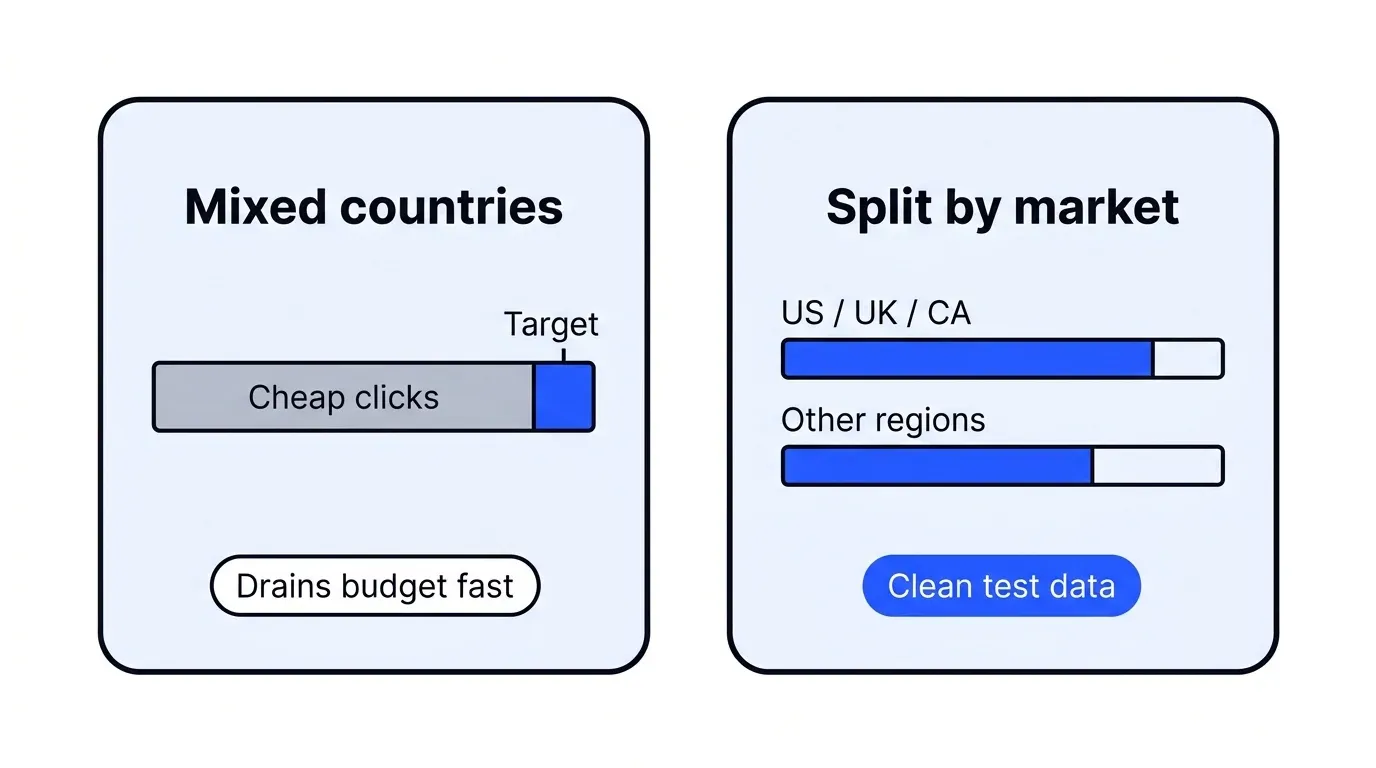
Because Promote runs on Google’s ad auction, the system looks for the cheapest way to hit your goal. If you mix high-CPM markets with low-cost ad markets in the same campaign, Google can pour 80% or more of your budget into the cheapest countries first. Google even warns in its Promote setup guidance that a promotion may deliver heavily in certain countries or at odd hours.
You wake up with 4,000 views and 300 subscribers for $100 and feel thrilled. Then you open YouTube Studio geography data and realize almost none of those viewers live in the market your sponsors pay for, speak your language natively, or buy the products you mention.
Worked example: why the cheaper subscriber is often the worse buy
The table below uses hypothetical numbers, not guaranteed campaign results. Picture two $100 Audience growth tests on the exact same 10-minute tutorial. Test A bundles worldwide English-speaking markets together. Test B locks targeting to the US, UK, and Canada only.
| Metric | Test A (Mixed worldwide) | Test B (US / UK / CA only) |
|---|---|---|
| Total promotion budget | $100 | $100 |
| Reported promotion views | 8,000 | 2,200 |
| Reported new subscribers | 250 | 60 |
| Cost per view | $0.0125 | $0.045 |
| Cost per subscriber | $0.40 | $1.67 |
| Organic Follow-on Views in 14 days | 90 | 420 |
| Cost per organic Follow-on View | $1.11 | $0.24 |
On paper, Test A looks four times cheaper per subscriber. In practice, Test B delivered nearly five times more Follow-on Views at less than a quarter of the cost per engaged viewer.
The cheaper number wins only if your goal is vanity. If your goal is a real audience that shows up on your next upload, measure cost per Follow-on View and returning viewers, not cost per raw click.
Watch the Google Ads billing rules before you click launch
Creators also get tripped up by how Google bills Promote campaigns. Charges run through your linked Google Ads account, not through YouTube directly.
According to Google Ads payment settings documentation, prepay is not available in the US, Canada, the UK, or Australia. Accounts there run on automatic postpay: Google charges your card on the 1st of the month, or earlier whenever spend reaches your payment threshold.
Two rules save you from billing headaches:
- Always set a firm end date and double-check the total budget before confirming.
- Never unlink your Google Ads account to stop charges. Pause the promotion inside Studio first, then settle or cancel the billing account using Google’s account cancellation steps. Unlinking first locks you out of managing the promotion in Studio.
Does YouTube Promote hurt your channel or kill organic reach?
No. YouTube states that running a promotion does not change how its recommendation system ranks your videos organically, because organic recommendations evaluate organic traffic separately.
Still, hundreds of creators swear Promote ruined their channel. Both sides are seeing something real. YouTube’s backend separates ad performance from organic ranking, yet two side effects make a promoted channel feel broken right after a campaign runs.
Side effect 1: Blended analytics look terrible
When your video runs as a skippable or in-feed ad, cold viewers decide in three seconds whether they care. Most leave fast. That is normal for every paid ad on earth.
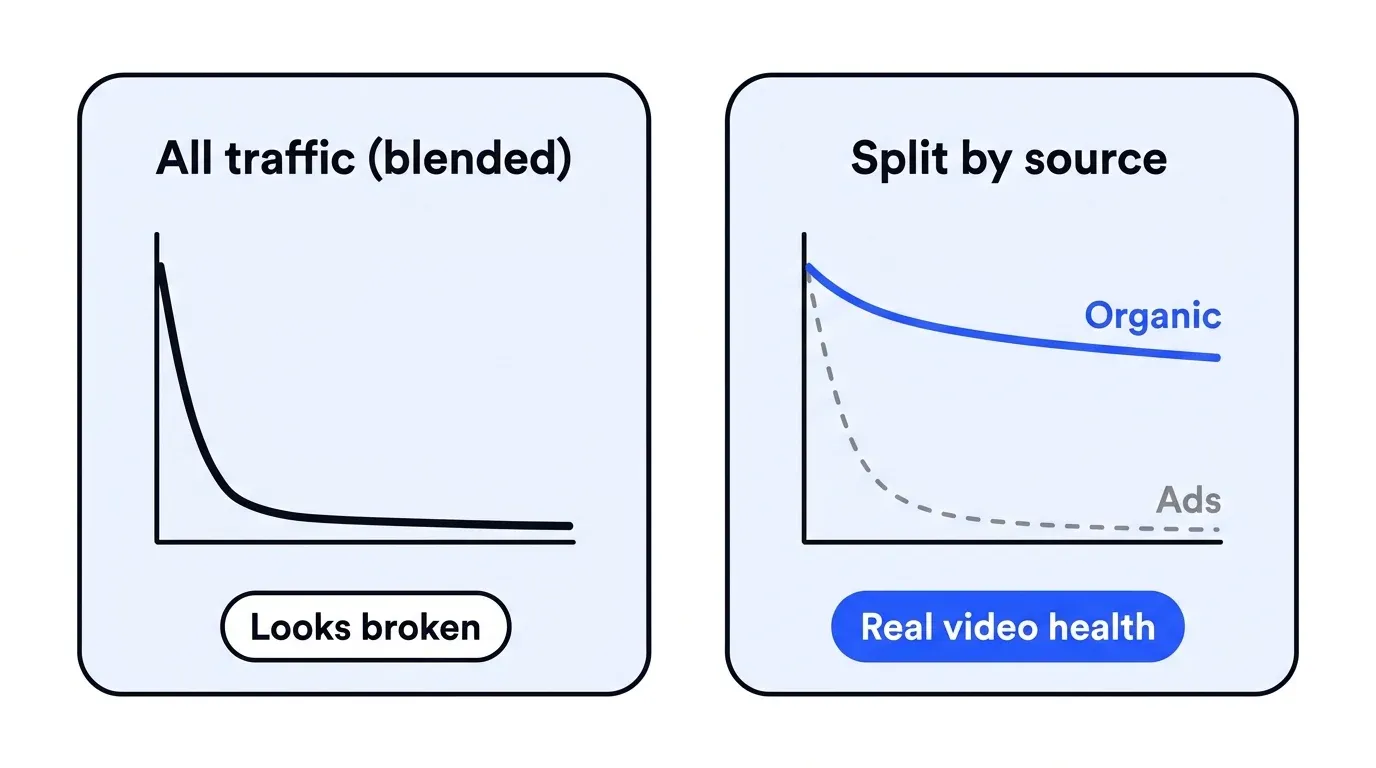
The problem is YouTube Studio’s default Overview and Engagement graphs. Those screens mash paid ad views and organic views into one blended retention curve. A video holding 52% of organic viewers at the 30-second mark can suddenly show 19% overall retention once 3,000 ad clicks land on it. Creators see that cliff, assume the video is dead, and stop promoting or delete it.
Side effect 2: Passive subscribers drag down your next upload
This one hurts if you target loosely. Suppose an untargeted Audience growth campaign adds 500 cheap subscribers who tapped subscribe on impulse and barely watch your topic.
When you publish your next video, YouTube tests it with a slice of your existing subscribers and recent viewers on Home and in Subscriptions. If a big chunk of those new subscribers scroll right past your thumbnail, your early organic CTR drops, and the post-campaign fall from 4,000 paid views back to 400 organic views feels like a shadowban.
Promoting Shorts vs. long-form videos
If you upload both formats, never judge a Shorts promotion by the same math as a long-form promotion.
Promoted Shorts pull cheaper views and fast subscriber taps because viewers swipe through the Shorts feed at high speed. The catch is format mismatch. Many people who subscribe from a 30-second Short never click a 14-minute video on your channel, and paid Shorts views do not count toward the Shorts Partner Program threshold either.
Promote the format you want those viewers to keep watching. If your main business or sponsorship rate depends on long-form videos, spend your test budget on a strong long-form gateway episode instead of chasing cheaper Shorts subscribers.
How to check your real organic numbers after a promotion
Never judge a promoted video from the main Studio Overview card. Run this quick audit instead:
Open the video in YouTube Studio Analytics
Go to Content, click your promoted video, open Analytics, and click Advanced Mode in the top right corner.
Split the table by Traffic source
Select the Traffic source tab so YouTube separates YouTube advertising from Browse features, Suggested videos, and YouTube search.
Compare Average Percentage Viewed side by side
Ignore the YouTube advertising row for a moment. Look at retention and CTR on Browse and Suggested to see whether organic viewers still love the video.
Check Returning Viewers on your next two uploads
Look at Audience > Returning viewers two weeks later. If the campaign brought real fans, returning viewers climb on the next videos in that same topic.
If organic retention on Browse and Suggested stayed strong, Promote did not hurt your video. If organic Browse retention was already weak before the ad ran, the video needed a sharper hook or tighter topic, not ad spend.
When is YouTube Promote worth it (and when should you skip it)?
YouTube Promote is worth a bounded test when one proven video has a measurable off-YouTube goal or a clear binge path on your channel. Skip it whenever you want monetization hours, organic rescue, or hands-off weekly growth.
Worth a bounded test
- You sell a product, course, service, or newsletter and can track clicks with a tagged URL.
- The video already beats your channel average for organic CTR and 30-second retention.
- Your end screen and pinned comment hand viewers straight into a second strong video.
- You isolate one country tier and cap your test budget to an amount you can lose.
Skip Promote for now
- You are trying to hit 4,000 public watch hours or 1,000 subscribers for YPP.
- The video flopped organically and you hope ad views will wake up the algorithm.
- You upload every week and do not want to set up, budget, and wait for review on every post.
- You have no way to judge success beyond a bigger public view counter.
Think about intent. A fitness coach promoting a 12-minute home mobility guide that links to a free PDF can measure exact email signups from a $100 Website visits campaign. At $2 per signup, that $100 buys 50 leads. If each customer brings in $100 of net contribution after costs, the campaign breaks even once 1 of those 50 signups buys (a 2% conversion rate), and every buyer after that is profit.
Now compare that with a commentary or travel creator trying to grow a channel for sponsorships and AdSense. Spending $100 per video to push a single upload after a two-day ad review, while getting zero direct YPP watch hours, rarely pencils out.
How do you run a clean YouTube Promote test without wasting budget?
Pick a video that already proves it holds organic viewers, lock your targeting to one market tier, build a next-video bridge, and write down your stop rule before spending.
If your channel fits the “worth a test” side above, treat your first campaign like a controlled lab experiment instead of a blind boost.
- Start with a proven winner, not a new upload. Wait at least 5 to 7 days after publishing. Pick a video whose organic Browse or Search retention beats your channel average. Promoting a weak hook only pays Google to show strangers why they should leave.
- Wire the Follow-on View bridge first. Point your end screen to one related video and pin a comment linking to it. Give viewers a clear reason to keep watching after the ad ends.
- Lock one country tier and tight interests. Run the US, UK, Canada, and Australia together, or test a single country alone. Never dump low-cost regions into the same campaign as your core market.
- Compare two videos on equal terms. Google’s creator playbook recommends testing two videos with the exact same budget, dates, and targeting. Keep the test small, such as $50 to $100 per video over 7 to 10 days, so you can see which hook converts better.
- Write your pass/fail line before launching. Example: “I will repeat this only if cost per Follow-on View stays under $0.35 or email signups cost under $3.” Without a written limit, it is too easy to talk yourself into another $100 just because the view count moved.
Warning
If a promotion sits in Pending longer than 2 days or gets marked Disapproved or Limited, check your title, thumbnail, and description against Google Ads rules using YouTube’s Promote troubleshooting guide. Narrow interest filters paired with a tiny budget can also stall delivery completely.
What is the smarter option if you upload every week?
YouTube Promote is built for one-off campaigns, so its per-video setup and up to two-day ad review fight against the rhythm of an active upload schedule.
Step back and look at how serious channels grow. You do not win on YouTube by boosting one random video once a quarter. You win when every new upload starts with real early momentum in front of people who have not subscribed yet, week after week, so your best ideas get a fair shot at Home, Suggested, and Shorts feeds, and your recent uploads look consistently strong to sponsors.
Manual ad tools create two structural bottlenecks for consistent creators:
- Timing lag: Waiting 1 to 2 days for a Google Ads policy review means paid visibility often arrives after your upload’s sharpest initial launch window has already cooled down.
- Setup fatigue: Choosing a video, setting a budget, picking countries, setting end dates, checking ad status, and tracking billing thresholds on every long-form video and Short turns promotion into a second part-time job.
Compare the three paid routes side by side:
| Factor | YouTube Promote | Full Google Ads | Automatic every-upload promotion (GrowMyProfile) |
|---|---|---|---|
| Setup per upload | New goal, audience, budget, and end date | Campaign, ad groups, bids, and placements | None. Set one plan once using your public channel link |
| Timing when you post | Waits for setup plus 1 to 2 day ad review | Waits for campaign launch and ad approval | Detects each new video and Short the moment it goes live |
| What you predict | Estimated range, charged at auction | Auction CPV/CPM or target CPA | The subscribers, views, likes, or watch hours you pick each month |
| Long-form and Shorts | Separate promotions per upload | Separate ad sets or Demand Gen setup | Covered automatically under one plan, with no limit on uploads |
| Best fit | One-off boost or direct website clicks | Businesses and brands managing full ad funnels | Consistent creators who want steady early reach on every new upload |
That gap is why we built GrowMyProfile for YouTube. Instead of building an ad campaign every time you publish, you enter your public channel link once (we never ask for your password, never log in, and never upload or subscribe for you).
From that moment on, every new video and Short is detected the moment it goes live and promoted to real people on YouTube who haven’t subscribed yet, Worldwide or in the USA. You mix the subscribers, watch hours, and video or Shorts views and likes you want in one plan, delivered gradually with no upload limit.
It starts instantly, you can cancel anytime from your dashboard, and your first purchase comes with a 30-day refund guarantee. If you want to see delivery on your channel before paying anything, you can test free YouTube views or free YouTube subscribers with no card required, or compare buying YouTube views on a single routine. And if you also cross-post short-form clips, our breakdown of whether TikTok Promote is worth it applies the same test framework there.
Keep one expectation honest across every promotion route, including ours: no service can guarantee Partner Program approval. YouTube decides what qualifies and reviews every channel that applies. What steady early promotion gives you is consistent discovery on every upload so your best videos do not stall with the same small group of subscribers.
Give every new upload a head start
Every new video and Short, promoted the moment it goes live to real people who haven't subscribed yet. No password needed, instant start, and cancel anytime.
Common questions about YouTube Promote
Do YouTube Promote watch hours and subscribers count toward monetization?
No. Direct watch hours, Shorts views, and subscribers gained from YouTube Promote or Google Ads do not count toward YouTube Partner Program thresholds. They raise your public numbers, not your Earn tab bar. One exception does count: Follow-on Views, which are organic views from people who click to watch another video on your channel after seeing your promotion.
Does YouTube Promote hurt your channel or kill organic reach?
No. YouTube says promotions do not change how its system recommends your videos organically, because recommendations judge organic traffic separately. A campaign can still make your charts look ugly in the default overview because paid viewers skip faster. Filter by Traffic source in Advanced Mode to see real organic retention, and target tightly so you do not collect passive subscribers who ignore your next upload.
How much does YouTube Promote cost, and what is the minimum budget?
You choose your own total budget cap per promotion, and Google will not charge more than that amount. YouTube Help lists no fixed minimum. Google says in its YouTube Promote creator playbook that results can start from $5 and recommends $100 or more so delivery has time to settle. Real costs per view and per subscriber vary sharply by country and niche.
Why did my audience retention drop after running YouTube Promote?
Cold viewers seeing your video as an ad leave much faster than people who searched for your topic or clicked your thumbnail on Home. By default, YouTube Studio blends ad traffic and organic traffic into one retention curve. Open Video Analytics, switch to Advanced Mode, and split by Traffic source to separate YouTube advertising from Browse, Suggested, and Search.
How do I stop a YouTube Promote campaign without losing access to it?
Open YouTube Studio, go to Content, open the Promotions tab, and click Details on the active campaign. Pause it from the Status menu or move the end date to today. Promotions created in Studio cannot be paused inside Google Ads, and unlinking your Google Ads account before you settle the bill removes access to your promotions.
Share this guide

Written by Gabriela Moreno
Gabriela writes our guides. We promote creators' new posts to real people who don't follow them yet, and she shares what we learn along the way. More guides